
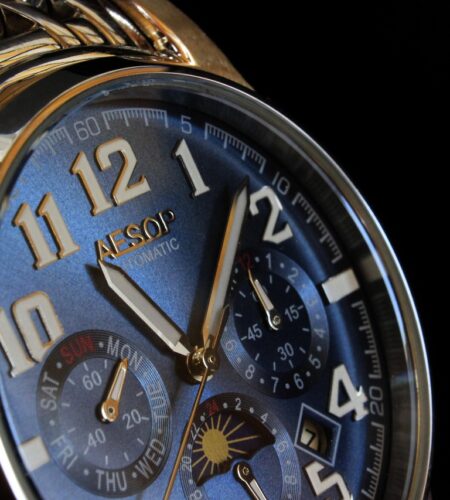
Small, reliable functions beat flashy extras when workload spikes.
Cockpit chaos — radios, ATC reroutes, a failing GPS and an incoming approach — makes a wrist glance a decision tool, not jewelry. On a cross‑country leg, an elapsed‑time lap saves mental arithmetic for fuel and alternates; during a diversion, a simple countdown keeps ETA updates crisp. When GPS fails, basic headings and periodic fuel checks become the immediate fallback; for IFR holds, a one‑minute timer with a 5–10 s buffer prevents drift. For background, see what is a pilot watch.
- IFR hold timing: use 1‑minute ticks, add a 5–10 s buffer.
- Diversion countdown: set a 5–10 minute ETA alarm for reroute clarity.
- GPS outage fallback: log headings and fuel every 15 minutes.
A navigation feature is any watch function that produces positional, temporal, or environmental information useful for route planning, heading control, or decision-making in the cockpit. These range from simple mechanical aids to full GPS waypoint tools.
- Analogue bezels (including slide‑rule bezels) — provide quick, in‑flight conversions and calculations (speed × time, fuel burn, distance, unit conversions) without reaching for a calculator. Useful for sanity checks and rough math.
- Chronograph — a stopwatch that times legs, holds, or approach segments. Elapsed times help compute distance flown, fuel used, and cross‑check ATC slot times.
- Compass bezel / magnetic compass tools — combined with a sun‑bearing method or an onboard digital compass, these give heading references for short corrections or emergency navigation when primary instruments are compromised.
- GMT / dual‑time — displays UTC alongside local time for flight planning, logbooks, and coordinating with ATC or dispatch across time zones.
- Altimeter / barometer — barometric trend data and altitude indications assist in situational awareness and early weather change detection.
- Timers / alarms — programmable alerts for fuel checks, approach windows, or step climbs that reduce cockpit memory load.
- Watch GPS & waypoint tools — provide position, bearing, distance, and basic route navigation independent of panel avionics; most useful as a backup or supplement.
How features were judged
Practical, flight-oriented criteria were applied to judge each watch navigation feature. Emphasis was on usable performance under real cockpit conditions rather than lab specs.
-
Real‑world accuracy & independence
Measured against known fixes and GPS; assessed whether the feature remains useful without aircraft systems or requires external inputs.
-
Speed of use & readability
Timed common tasks with gloves and in simulated turbulence; checked legibility at a glance and the number of steps to get actionable information.
-
Battery, reliability & operational limits
Checked continuous-use battery drain, failure modes, and any regulatory or airline-operational restrictions that would limit in-flight legality or practicality.
Quick analogue routines: E6B bezel, chronograph, and compass checks
-
01Distance / time with the slide-rule bezel
Set the watch’s speed (knots) against the 60-minute mark, then read the time opposite a planned distance. For example, to find minutes for 30 nm at 120 kt, place 120 opposite 60 and read minutes at 30. For a fuller primer, consult the slide rule bezel for navigation estimates.
-
02Fuel conversions and endurance
Place the hourly fuel burn opposite 60 to convert to fuel per minute or to read remaining endurance against available fuel. Example: 12 gph opposite 60 shows 0.2 gallons per minute — use that against planned minutes.
-
03Chronograph timing for holds and time-to-fix
Start the chronograph over the outbound fix or abeam position; use the elapsed minutes to fly the published outbound leg or calculate inbound time. For time-to‑fix on a VOR or waypoint, start on intercept and stop at the crossing to log the actual time-to-fix.
-
04Compass‑bezel magnetic checks
On a known heading (runway or radial), rotate the bezel to mark the magnetic heading, then compare the watch-reading to the aircraft compass. Record any consistent offset as a quick deviation check during cruise. Repeat in both directions if possible.
-
05Rapid routine and known limits
Keep a two-step routine: set bezel, read value, note on paper/chart. Remember these are approximations — wind, method error, and human reaction introduce bias; always cross-check with primary instruments and flight planning.
Quick cautions:
Accuracy: bezel math is useful for estimates, not precision navigation; expect several percent error. Chronograph error: human start/stop reaction skews short intervals. Compass interference: metal, electronics, and cockpit layout affect magnetic readings.Treat watch techniques as redundant cross‑checks. Precompute critical values on the ground and use watch calculations only to confirm, not replace, avionics.
Which digital features actually help — and where they stop
Several watch functions are genuinely useful in flight, but each has clear operational limits. Treat them as aids, not substitutes for certified avionics.
- GMT/UTC display: Keeps logbooks, clearances and position reports consistent. Set a dedicated UTC hand or dial and use it for time-stamping and fuel/time checks. Limit: it helps coordination, not navigation accuracy.
- Timers and alarms: Ideal for TOD, approach windows, and holding legs. Use multiple named alarms if available. Limit: alarms depend on user setup and can be missed in high workload.
- Barometric trend/altimeter: Useful for short-term pressure trends and detecting rapid weather changes. Limit: on-watch baro is not certified for flight altimetry; cross-check with the aircraft altimeter and ATIS.
- On-watch GPS (VFR positional awareness): Great for a quick position fix, traffic avoidance, and verifying checkpoints. Limit: accuracy and update rate are usually inferior to panel GPS; touchscreens and menus are glove-unfriendly and slow in turbulence.
Practical reminders:
- Cross-check every watch readout against certified avionics.
- Monitor battery use; GPS and continuous backlight drain batteries quickly.
- Keep interactions brief — set alarms and presets on the ground and avoid complex input inflight.
Do not rely on a watch as primary navigation. Watches are excellent situational aids but lack certification, redundancy, and the ergonomics of cockpit instruments. Always verify with certified avionics and carry power/backup for longer flights.
When to reach for the watch vs the panel — step-by-step routines
-
Preflight sync and setup
At walkaround, set the watch to the same UTC/local time as the panel, reset the chronograph to zero, and align the bezel index to a known minute marker. Verify battery/GPS status and tape or note any offsets so the watch is a reliable secondary reference.
-
Departure and climb — quick timers
Use the panel as primary navigation; use the watch for short timers (climb segments, engine run-ups). Start the chronograph at brake release and use a 5–10 second glance pattern to read elapsed time without interrupting the scan.
-
Diversion planning — bezel + chronograph
Start the chronograph when beginning diversion calculations, set the bezel to represent minutes-to-ETA based on planned groundspeed, and use elapsed minutes to update ETA. Cross-check with the panel GPS once the quick estimate is complete.
-
Timing holds and procedures
Start or lap the chronograph at the outbound abeam/fix or wings-level. Use the bezel to mark inbound crossing minutes and watch splits to adjust leg times; confirm with panel nav/FMS when workload permits.
-
Quick situational checks
Use the watch for short, repeatable checks: fuel burn since last checkpoint, time to next reporting point, or countdown to approach. Pre-set markers and practice sub-5-second glances to keep head-down time minimal.
Run the full sequence on preflight and in a simulator: sync, start/stop chronograph, set bezel, and read splits. Memorize a two- or three-step flow for each task so operations become muscle memory and glances stay under five seconds. Treat the watch as a quick backup and timing tool — not the primary nav source.
Match features to mission: prioritized checklist
High-contrast dials, large hands, strong lume and an anti‑reflective crystal matter most. For VFR local and cross‑country, quick daytime glances suffice; for IFR backup, prioritize low‑light readability and uncluttered indices.
A firm, positive detent bezel with clear minute markings reduces fiddling. Simple uni‑directional elapsed bezels work for local VFR; slide‑rule or calibrated bezels can help cross‑country math but only if used regularly; IFR backup benefits from a single reliable elapsed bezel.
Large knurled crowns, tactile pushers, or recessed protected controls are essential when wearing gloves. Pilots flying short VFR hops want quick operation; long XC or IFR flights favor controls that resist accidental activation.
Prioritize long battery life (or solar), shock resistance and common, easily serviced movements. Cross‑country and IFR backup demand independence from panel power and accessible maintenance; ruggedness reduces failure risk in active cockpits.
Common navigation myths, corrected
Most watches use consumer GPS and are not certified for primary navigation.
They have slower update rates, weaker antennas, and lack regulatory certification or RAIM guarantees.
E6B bezels still solve fuel, groundspeed, and time‑distance without power.
They give quick multiplicative answers and independent cross‑checks during high workload.
Barometers show pressure and trends; altimeters require a set reference and calibration.
Without correct QNH and calibration, altitude from a watch can be off by hundreds of feet.
Quick verdicts: which watch features matter
Immediate action checklist
- Sync watch time (UTC/local) to avionics before taxi.
- Confirm chronograph zero and practice a start/stop run.
- Set bezel marker for takeoff or next waypoint; note elapsed baseline time every leg changeover.
Practice the simple routines preflight and in calm air. Keep the watch as a crosscheck and short‑term timer — never substitute a watch for certified avionics. Treat battery state and manual controls as part of the preflight flow.
Short and sweet — glad you emphasized legible timers. In a busy cockpit a tiny digital readout is useless if I have to squint. Simple chronograph + big numerals > fancy multi-function screens for quick tasks.
I use the E6B bezel routines on a cheap pilot watch for XC legs and they do shave down workload, especially when combined with a quick cross-check against ground speed from the GPS. The article’s point about battery reliability is also key — I ruined a flight by forgetting to charge my multi-function watch battery before a diversion.
Question: for longer XC flights (3+ hours) with mixed VFR/IMC sections, would you prioritize an analogue watch with bezel and mechanical chronograph over a smartwatch that can receive ADS-B weather? The article’s checklist nudges toward power and legibility, but I’m torn.
For long XC legs with mixed conditions I generally recommend prioritizing redundancy and independence. An analogue watch with a reliable chronograph and bezel is excellent for basic nav tasks and won’t die from a software crash or cellular dependency. If you can carry a separate ADS‑B receiver or tablet (with its own power) that gives weather, that’s a better mix than relying on a smartwatch alone. Smartwatches are handy, but battery life and dependence on paired devices make them secondary instruments rather than primary tools.
Agree with Admin — I fly XC often and the analogue + dedicated ADS-B receiver setup has saved me. Smartwatch is nice for backup but not primary, especially on nights or when I need long on-scene timing.
One nitpick: the article rates features on accuracy and speed, but didn’t dive deep on human factors for readability under NVG or with gloves. For example, some bezel controls are tiny and impossible to operate with winter gloves, which makes them effectively unusable on cold IFR cross-country legs.
Would love a quick addendum on recommended crown/bezel sizes or examples of watches that perform well in glove/low‑light operations.
Good point. We tried to keep the feature checklist vendor-agnostic, but human factors like crown size, bezel grip, and lume are crucial. Quick tips: look for oversized crowns or bezel knurling for glove use, strong lume or tritium tubes for low-light readability, and tactile clicks on bezels so you can confirm inputs without looking. I’ll add a short appendix with example specs to help choose models.
Loved the myth vs fact section — finally someone calling out watch GPS hype.
But I’m curious about the compass + bezel deviation check routine: how accurate is that in small GA birds that have older electrical systems? I’ve seen magnetic interference vary a lot depending on passengers and loading.
Great breakdown of when a watch is appropriate vs the panel. Quick question: when you say “never substitute a watch for certified avionics,” how do you recommend handling an inflight avionics failure on a night IMC leg where panel instruments are out but the watch still has timers and compass? Would you still advise against leaning on the watch for navigation until you get VMC?
Good scenario. The short answer: use the watch for short-term situational awareness only — timing holds, keeping track of headings, and running descents — but not for primary navigation or attitude. If you lose panel instruments at night IMC, follow emergency procedures: fly the attitude instrument failure checklist, declare an emergency if needed, and prioritize control of the aircraft. Use watch features (chronograph, bezel, compass) to support those tasks, but do not rely on them as certified substitutes for attitude or primary nav instruments. Also brief your approach/diversion early so you can get to known visual references or ATC vectors as soon as possible.