

Reliable weight readings and easy app syncs — body-composition numbers are trend indicators, not gospel.
Ever step on a scale and wonder if that number really reflects your progress? Tracking weight, muscle gains, and body-fat trends can be maddening when readings fluctuate, logging is manual, and apps don’t play nice together.
The Etekcity FSA&HSA Eligible Smart Scale pairs consistently accurate weight readings with BIA-based body-composition estimates and wide app compatibility (Apple Health, Google Fit, Fitbit, MyFitnessPal). It’s a practical daily tracker for families and fitness fans who want automatic syncing and clear trend data — just keep in mind BIA values are best treated as directional trends, not absolute medical measurements.
Etekcity Smart Body Composition Scale

A dependable, accurate bathroom scale that pairs solid weight measurement with useful body-composition metrics and broad app compatibility. It’s a practical choice for families and fitness trackers who want automated syncing and clear progress tracking, though BIA limits mean composition numbers should be used as trends rather than absolute truth.
Smart Fitness Scale Review: Etekcity in-Depth Look
Overview
This Etekcity smart scale mixes accurate weight measurement with a robust set of body-composition estimates and modern app connectivity. It’s built to serve everyday users and families who want straightforward tracking without complicated hardware. The scale uses bioelectrical impedance analysis (BIA) for estimates like body fat and muscle mass and pairs with a mobile app that can sync to major health platforms for consolidated tracking.

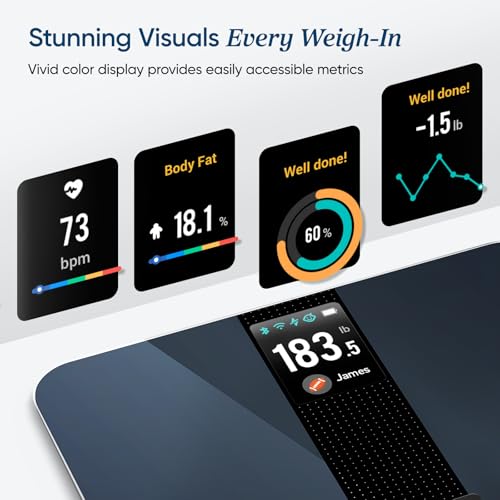
Key features at a glance
What the metrics mean (and how to read them)
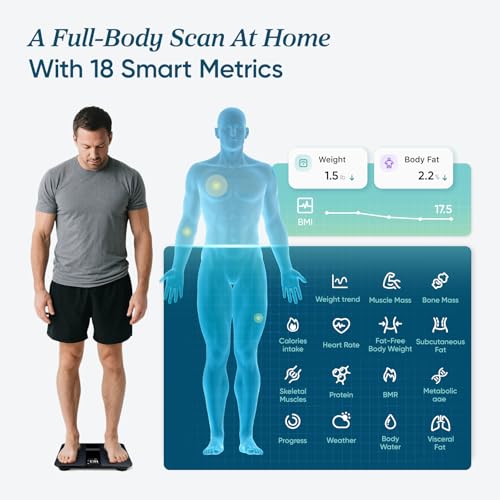
Bioelectrical impedance-based scales estimate body composition by passing a small, safe electrical signal through the body. The scale then calculates values from the resistance encountered. This method provides quick and noninvasive estimates, which are best used for trend-tracking rather than clinical diagnosis.
| Metric | What it tracks | How to use it |
|---|---|---|
| Weight | Total body mass | Primary objective measurement for tracking weight loss/gain |
| BMI | Weight-to-height ratio | Useful broad indicator; doesn’t capture body composition nuances |
| Body Fat % | Estimated percentage of body fat | Track over time—don’t treat a single reading as definitive |
| Muscle Mass | Estimated lean muscle weight | Useful for strength-training progress monitoring |
| Bone Mass | Estimated bone mineral mass | Not diagnostic; helpful for long-term tracking |
App, connectivity, and multi-platform sync
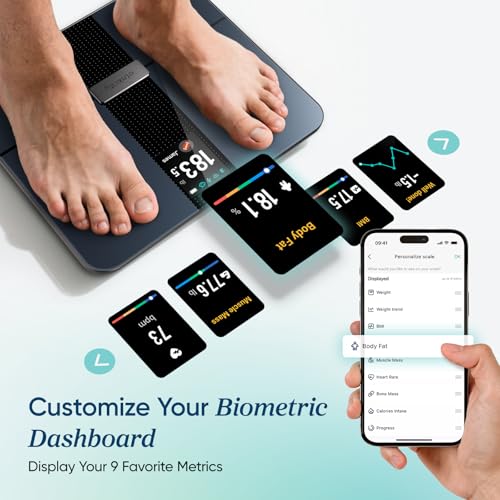
The scale pairs with the Vesync app for setup, history, goal setting, and data visualization. Once connected, you can enable syncing to third-party platforms so your data flows into your preferred health dashboard.
Design and usability
The scale’s low-profile tempered glass platform blends into most bathrooms and stays comfortable for users of various shoe sizes. The platform is large enough for a stable stance, and the display provides bright, easy-to-read numbers. Design choices focus on simple daily use: step on to wake, step off to power down, and automatic profile detection to minimize taps on the phone.
Key design notes:
Real-world accuracy and consistency
User reports and testing show the scale provides very consistent weight readings—repeatable down to the tenth of a pound/kilogram. That consistency makes it a reliable tool for daily weigh-ins. Keep in mind the difference between weight accuracy (usually high) and BIA-based composition accuracy (moderate): the latter fluctuates with hydration, recent exercise, meals, and time of day.
Practical accuracy tips:
Setup, pairing and everyday tips
Limitations and what to watch for
While this scale is a strong choice for home tracking, BIA technology has inherent limits. Hydration level, recent workouts, and meal timing can swing body-fat and muscle estimates. Additionally, barefoot contact is required for composition metrics—socks or slippers will block accurate measurement. Some users may also experience occasional Bluetooth pairing delays, which are typically solved by restarting the phone or toggling Bluetooth.
Who should buy this scale?
Final summary
This smart scale combines dependable weight measurement with a practical set of composition metrics and broad app ecosystem support. It’s a compelling choice for everyday tracking—especially for users who want to automate and centralize health data across platforms. Use the composition numbers to follow trends over weeks and months, and rely on the weight readings for day-to-day consistency.
FAQ
Yes. The scale gives consistent weight readings with fine resolution (typically 0.1 lb / 0.05 kg).
For best day-to-day consistency follow these practices:
Expect small natural fluctuations of a few tenths of a pound from day to day. If you suspect drift, compare with a known-weight object or another calibrated scale to verify.
Yes. Bioelectrical impedance (BIA) results are affected by short-term physiological factors.
Follow these conditions for the most consistent readings:
Also note that hydration level, recent illness, menstrual cycle, and some medications can change readings. BIA gives estimates and is best for tracking trends rather than single-point accuracy.
Yes. The scale supports multiple user profiles and automatic recognition via the app.
How it works and how to avoid mix-ups:
Check the app for the maximum number of supported profiles and encourage each person to confirm their profile after first use to improve recognition.
Eligibility varies by model, retailer, and individual plan. “FSA/HSA eligible” typically means the item may qualify as a medical or health-related expense under certain plans.
Steps to confirm eligibility and pursue reimbursement:
Do not assume reimbursement until your plan administrator confirms eligibility for your specific account.
Try these troubleshooting steps in order:
If problems persist, try pairing with another phone to isolate the issue, or contact support with the model and app logs.
No. Consumer BIA scales provide useful estimates but are not clinical diagnostics.
Key points to understand:
If you need clinical-grade assessment, consult a healthcare provider for laboratory or imaging-based tests.
Yes. The scale syncs through the Vesync app to a range of health platforms.
What to expect when connecting:
If a metric is missing in the other app, verify mapping and permissions in both Vesync and the receiving service.
Yes. Small routines improve consistency and make trends more meaningful.
Follow these simple tips:
These steps reduce measurement noise and make progress easier to interpret.
Short and sweet: works as expected. Solid display, easy app, decent build. No drama. 👍
Appreciate the concise review, Harper — sometimes ‘no drama’ is exactly what you want in a bathroom scale!
Amen. My house doesn’t need a complicated gadget in the bathroom 😂
I measured against a calibrated gym scale. Weight matched within 0.2–0.4 lbs which is great. The body comp numbers were different but consistent in direction. Interface is clean.
If you want accurate weight at home and convenient Apple integration, this is a sensible buy.
Thanks for the numbers, Michael — that’s the kind of empirical check I like before buying.
@Rachel No problem — took me two tries to set it up but then it was fine.
Good to know about the gym comparison — consistency within a few tenths is solid for home use. Appreciate the real-world test.
Has anyone used it alongside a fitness tracker? I’m wondering if calorie burn numbers sync or if it’s just weight/BMI/body comp.
Thanks, good to know. That’s the setup I want.
So you can view everything in one place in Apple Health. That’s handy.
It syncs to Apple Health, so if your fitness tracker writes data to Apple Health the combined ecosystem will reflect both — but the scale itself only provides weight and composition metrics.
Just remember the scale’s composition data won’t change workout estimates — it’s mostly for history and trends.
I use it with an Apple Watch. Weight and body metrics go into Health; workouts still come from the watch. Nothing automatic beyond that integration.
Quick question: does it show BMI on the scale itself or only in the app? Thinking of gifting this to my partner.
Perfect — thanks! App display is fine for us.
The scale displays weight on its screen. BMI and detailed composition metrics are shown in the app; some models show BMI briefly after weighing but the app is where full breakdown appears.
Humor time: My cat walked on the scale and got a ‘new user’ notification. 10/10 would recommend for feline weight surveillance. 😂
On a serious note: it’s durable and the surface cleans easily. Good for clumsy humans like me.
Worth it for cat weight tracking alone 😉
Lol, my cat too! Had to move the scale into the bathroom cabinet when I’m not using it.
Cats everywhere will be starting health journals. Thanks for the laugh, Jack — glad it held up!
I was skeptical about smart scales until I tried this. Pros: affordable, Apple Health support, decent accuracy for weight. Cons: body composition can mislead if you don’t understand BIA limitations.
If you’re tracking for motivation rather than clinical precision, it’s excellent. If you need medical-level accuracy, go for a clinical device or DEXA scans.
Also FYI: make sure feet are dry and standing posture is consistent for the best repeatability.
Well said. We emphasized using composition metrics as trend indicators in the review for the same reasons.
@Danielle same here — seeing the graph move in the right direction was worth it.
This. I used mine for 3 months and the trends helped keep me motivated more than exact numbers did.
Good tip about dry feet and posture — small things that improve consistency.
I noticed a weird readout once where it gave a very low muscle mass. Restarted the scale and it was fine. Anyone else see occasional glitches?
Occasional anomalous readings can happen if you shift or don’t stand still. Restarting/power-cycling usually resolves infrequent outliers.
Picked one up last month. Setup was straightforward and it synced with Apple Health like it said. The weight measurements feel consistent, but the body fat numbers jumped around a bit after a week — I guess that’s expected with BIA.
Overall happy for $80, would recommend if you want something reliable without spending a ton.
Do you use the app’s multiple user feature? I have two people in the house and it sometimes mixes us up.
Same here — weight’s steady but body fat fluctuates with hydration. I log mornings only and that reduced the swings.
Thanks for sharing, Oliver — glad the sync worked well for you. Yeah, the review mentions BIA variability; treating composition as trend data is the best approach.
Just ordered one after reading this review. Fingers crossed it arrives before the new year. 🎁
Thanks for the support, Emma — hope it arrives quickly and works well for you!
I love that it supports Apple Health. Setup with my iPhone was a breeze.
Couple of notes:
– The screen is bright enough to read in the bathroom.
– Weigh-in recognition for family members is decent but not perfect.
– The scale feels well-built for daily use.
For the price, I think it’s a great value. 🙂
@Omar Yes, it stores data onboard and syncs when you open the app. I do that sometimes when traveling.
App compatibility was one of the pros we highlighted. Good point about recognition — it’s usually fine for adults but kids/pets can cause confusion.
Correct — the device caches readings and syncs later. Good for times when your phone isn’t immediately available.
I have 4 people using it and it rarely mixes us up. Pro tip: stand still until the app confirms the user.
Does it store history if your phone isn’t nearby? I want to weigh in without my phone every day.
My partner and I both use it. It recognizes users pretty well but sometimes it confuses us if we weigh one after the other too fast. Also, the composition report is neat for comparing monthly changes.
Longer note:
I’ve been tracking for 6 months. The scale helped me notice small trends that my clothes also picked up on. It’s not perfect (sometimes takes a few tries) but it’s become part of my routine. Worth the price in my opinion.
Also try making sure each person has obvious weight differences in initial sign-up — similar weights can confuse recognition.
I echo the pause tip — that solved weird double-reads for me too.
@Samantha Waiting 10-20 seconds usually helps. The app should confirm the profile too.
Thanks for the long-form feedback, Lucas — love the real-world tracking example, that’s exactly the use-case we had in mind.
Good troubleshooting tips from everyone. Small pauses and confirming profile in the app help reduce mismatches.
Do you have to wait a bit between weigh-ins for it to recognize separate users? We had issues when doing back-to-back weigh-ins.
I’m considering this for my elderly mom who needs a simple reliable scale. Is the display easy to read? Also curious if it handles heavier weights well.
Bought one because the review mentioned it’s good for families. We have three adults and it handles profiles well.
A few things I noticed:
1) The BIA muscle mass readings seemed off compared to a gym test, but the trend lines matched.
2) Pairing took one try, no drama.
3) The build is sleek and flat — fits nicely in our small bathroom.
4) Battery life seems decent so far.
5) Would prefer a removable battery cover, small gripe.
Would recommend for home use — especially if you want Apple Health sync and easy sharing of progress charts.
Can confirm battery door is snug. Took me a minute to open it but it’s fine once you get used to it.
Lol @battery cover — first-world problem but I felt it too 😂
@Samantha DEXA — the absolute numbers were different but the weekly trend was consistent.
Which gym test did you compare to? I’ve had similar differences between scales and DEXA scans.
Good clarification — DEXA vs BIA discrepancy is common and expected. Thanks for sharing your comparison.
Thanks for the detailed notes, Ava. The review does mention treating composition metrics as trends — glad your experience matches that.
Price is nice at ~$80. I compared a few models and this seemed like the best balance of features and quality. App is intuitive.
Also, the expert rating of 8.6 sounds about right — not perfect but very solid for home use.
Pricing can fluctuate on retail sites; the product info we had listed $79.99 as the current price.
@Tom Amazon listing had it at $79.99 when I bought it last month. Check for sales.
Where did you find it for $80? Amazon has varying prices.
Good basic smart scale. I mostly care about accurate weight and easy syncing; it delivers on that. No dramatic features but solid performance.