

Why Chest Strap Heart Monitors Matter for Smartphone Users
Chest strap heart monitors remain the GOLD STANDARD for accurate, beat-to-beat heart-rate measurement. They record electrical signals at the chest and cut through motion noise that wrist sensors struggle with. When paired with a smartphone, straps become portable labs for training, recovery tracking, and remote clinical monitoring.
This article compares smartphone-compatible chest straps across accuracy, latency, connectivity, and comfort. We cover pairing protocols, platform and app support, and real-world use cases including performance sports, group workouts, and clinical scenarios. Finally, we examine data pipelines, analytics, and buying and maintenance advice to help you choose a strap that fits your goals and budget. Expect practical recommendations and clear comparison tables to help.


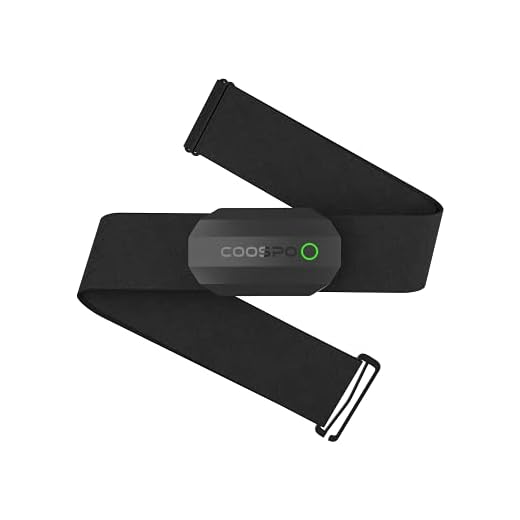
COOSPO H9Z Heart Rate Monitor Chest Strap — Bluetooth 5.0 & ANT+ Chest Sensor
How Chest Strap Heart Monitors Work and What Smartphone Compatibility Adds
Physiology and sensing: ECG-style vs optical
Chest straps use surface electrodes to detect the heart’s electrical activity — essentially a single-lead ECG. They pick up the sharp R‑wave (the big spike in each heartbeat), which gives clear beat-to-beat timing and high-fidelity interbeat intervals (RR). By contrast, wrist optical sensors measure blood-volume changes with LED photoplethysmography (PPG), which is more sensitive to motion, sweat, and perfusion changes. In practice that means chest straps stay reliable during sprints, heavy lifting, or change-of-pace efforts when PPG can lag or jump.
Transmission protocols: BLE, Classic Bluetooth, and ANT+
Choosing a strap that supports two protocols (BLE + ANT+ or BLE + Classic) increases compatibility with phones, watches, bike computers, and gym hardware.
What smartphone compatibility actually enables
Pairing a strap to your phone gives you live telemetry, on-screen HR zones, interval alerts, and session recording. Manufacturer apps can push firmware updates that improve signal filtering or add features (e.g., cadence input, running dynamics). Cloud syncing lets coaches and clinicians review sessions remotely and perform longitudinal analysis.
Quick practical tips
Next up: how we measure and compare accuracy, latency, connectivity, and comfort in real-world testing.
Key Comparison Metrics: Accuracy, Latency, Connectivity, and Comfort
Accuracy: sample rate, ECG vs HR-only, and artifact rejection
Accuracy hinges on whether a strap records true ECG R‑waves (beat‑to‑beat timing) or reports averaged HR. Look for straps that sample internally at higher rates (many use ~100–1000 Hz) and expose RR intervals. Equally important: onboard or app-side artifact rejection—good straps flag and discard ectopic beats or motion spikes. Expect top straps (e.g., Polar H10, Garmin HRM‑Pro) to be within 1–2% of clinical single‑lead ECG for steady-state and interval work.
Latency: live coaching and overlays
Latency matters for live biofeedback, virtual coaching, or video overlays. Measure end‑to‑end delay (strap → phone/app → display). Benchmarks:
Wireless stability and multi‑device support
Test range and interference: typical reliable BLE range is ~5–10 m indoors; open‑air can approach 20–30 m. ANT+ or broadcast BLE modes enable one strap to feed multiple devices—critical for a coach streaming to several athletes. Check whether the strap supports BLE + ANT+ if you mix phones, watches, and bike head units.
Battery, charging modes, and durability
Coin‑cell straps often last months (roughly 200–500 hrs); rechargeable models vary (8–30 hrs per charge depending on features). Look for easy battery swaps, USB charging, and firmware update capability. Durability: IPX7 or better for sweat/pool use; stainless contacts or silver‑plated electrodes resist corrosion—rinse after salty workouts.
Comfort and fit
Materials (soft silicone or fabric strap), electrode width, and adjustability determine wearability. Try a snug under‑sternum fit; wider pads reduce hot spots during long runs.
Recommended test scenarios and benchmarks
Next, we’ll walk through compatibility and pairing—protocol quirks, platform limitations, and which apps actually make the most of your strap.
Compatibility and Pairing: Navigating Protocols, Platforms, and App Support
Platform differences: Android vs iOS
iOS apps use Apple’s CoreBluetooth and only speak BLE; there’s no native ANT+ support. Android is more flexible: many phones have BLE and some include ANT/ANT+ (or can use vendor APIs). Practical result: an iPhone user can pair any BLE strap quickly, while ANT+‑only straps need an intermediary on iOS.
When dongles and adapters are needed
If you rely on ANT+ (coaches, multisensor bike trainers, older gym kits), a dongle can be the simplest fix. For laptops or older Android devices without ANT+, or for connecting multiple ANT+ sensors to a PC, a USB stick is invaluable.
If your setup needs it, try a reliable stick such as the CooSpo USB ANT+ Dongle for Indoor Cycling which turns a USB port into an ANT+ hub for Zwift, TrainerRoad, or gym software.
Multiple simultaneous connections and broadcasting
Some straps broadcast in “open” BLE mode and support one-to-many connections; ANT+ is explicitly designed for many-to-many. Real-world tip: coaches streaming heart rate to several athletes should prefer ANT+ or straps advertising dual BLE/ANT+ modes (e.g., Polar H10, Garmin HRM series).
App and platform compatibility
Top apps that support straps: Zwift, TrainerRoad, Wahoo, Strava (live), Garmin Connect, Apple Health, Google Fit, Elite HRV. Check whether an app reads RR intervals (needed for HRV) or only average BPM.
Common pitfalls and practical fixes
Why ongoing software support matters
New iOS/Android releases change Bluetooth stacks and security. Choose manufacturers that push firmware and app updates so your strap keeps working after OS upgrades.
Next up: translating those raw signals into useful insights—how data and analytics shape training decisions.
Real-World Use Cases: Performance Sports, Group Training, and Clinical Monitoring
Runners and Cyclists: live telemetry, cadence overlay, and bike computer integration
Road athletes need rock‑solid live BPM, low latency, and the ability to layer HR over speed/cadence maps. For cyclists, ANT+ to a Garmin Edge or dual‑mode BLE+ANT+ straps (Polar H10, Garmin HRM‑Pro) let you feed both a bike head unit and a phone running mapping apps. Runners benefit from straps that stream RR intervals for stride‑to‑stride HRV and connect to smartwatch + phone simultaneously.

Actionable tips:
HIIT and Group Fitness: rapid changes, short‑interval responsiveness, multi‑user broadcasting
High‑intensity classes spike and drop HR in seconds. Straps must sample quickly, report near‑real‑time BPM, and handle fast on/off intervals. If you coach a class, prefer ANT+ or straps that support multiple simultaneous BLE connections (e.g., Garmin/Polar dual‑mode) so several devices can read one transmitter.
Practical tips:
Clinical and Recovery Monitoring: continuous accuracy, export, and alerts
Post‑op or cardiac rehab needs continuous, artifact‑free RR data, clinician‑ready exports (CSV/EDF), and configurable alerts for brady/tachy episodes. Polar H10 and many medical‑grade chest straps offer validated RR outputs; confirm the vendor provides raw data export and secure transfer.
Best practices:
Environmental factors to watch across scenarios:
Data, Analytics, and Ecosystem Integration: From Raw Signals to Actionable Insights
What chest straps actually deliver
Chest straps provide more than “heart rate” numbers. Typical raw outputs include:
These raw RR streams are the gold standard for downstream analytics—coaches use them differently than a casual user who only watches BPM.

How apps turn beats into guidance
Modern apps smooth and interpret RR data into:
Practical tip: for adaptive plans, prefer apps that expose RR intervals and let you set your own zone algorithms (not just opaque “scores”).
Ecosystems, exports, and integrations
Look for straps and apps that sync with:
Common export formats: CSV for tables, FIT/TCX for workout files, and sometimes EDF for clinical signals.
Privacy, vendor openness, and how to evaluate analytics
Ask these questions before buying:
Quick vendor checklist:
A coach once avoided a promising strap because it blocked RR export—remember, analytic flexibility often matters more than a neat app UI. Next, we’ll use these assessment points to prioritize features and budget in the buying guide.
Buying Guide: Prioritizing Features, Budgeting, and Maintaining Your Strap
Start with your primary use case
Decide first: competitive athlete, group class instructor, or clinical monitoring? If performance matters (intervals, power-correlated zones), prioritize straps with RR export and proven accuracy (Polar H10, Wahoo TICKR). For social fitness, convenience and multi-device pairing may trump sub-millisecond precision.
Set a realistic budget
Expect a good strap to cost $50–$120; clinical-grade or brand-name models sit at the high end. Cheap straps (<$40) can work for casual BPM but often sacrifice durability or export features. Consider total cost: replacement bands, spare modules, and subscription apps.
Shopping checklist: specs to verify
Accessories you should buy or budget for
Care, battery, and storage best practices
Warranty, support, and end‑of‑life signals
Choose vendors with 1–2 year warranty and clear support channels. Seek replacement or service if you see frequent signal dropouts, inconsistent BPM vs. perceived exertion, or physical corrosion on contacts.
With these practical checks and care routines, you’ll narrow choices quickly and keep your strap reliable—next, the Conclusion will help you make the final selection.
Making the Right Choice for Your Smartphone-Connected Heart Monitoring
Balance trade‑offs between raw accuracy, wireless reliability, and everyday comfort. If you prioritize elite performance or clinical-grade data, favor proven chest straps with low latency and broad protocol support. For casual users, comfort and app ecosystem often matter more than marginal accuracy gains.
Match strap capabilities to your primary need—training intensity, group sessions, or health monitoring—and test pairing with your phone and apps before buying. Choose deliberately, keep comfort and compatibility top of mind, and let reliable data drive smarter workouts and safer health decisions. Start with one trusted strap today.
Bottom line: For most people who want reliable smartphone-connected monitoring, Polar H10 or a dual-mode option like moofit HR8 / COOSPO H808S covers most bases. If you want durability and easy washing, Garmin HRM 200 is tempting. The article helped me prioritize features vs budget — thanks!
Thanks for the summary — that’s exactly the trade-off the buying guide aims to clarify. Happy training!
Solid conclusion. I’d add: if you need ANT+ for cycling, double-check your phone/head unit compatibility before committing.
Okay ppl, confession: I bought a cheap chest strap once and it gave me heart rate readings of 200 during a calm yoga session. Panic ensued. 😂
Since then I’ve been testing: Polar H10 (solid), Powr Labs (comfortable), Garmin HRM 200 (sturdy). Also used the CooSpo USB ANT+ Dongle for a sad little indoor trainer and it worked like a charm. Moral: don’t cheap out on sensors if you want sane data.
Pro tip: test a strap on a light walk right after buying to ensure sanity before you use it in a race.
Sometimes sweat + loose contact = crazy spikes. Wet the strap slightly before workouts for better contact.
That’s a great cautionary tale — bad sensors can lead to false alarms. Stick to reputable models for anything that informs training or health decisions.
Also check firmware and app permissions — weird pairing behavior can cause bad reads.
Hah, I’ve seen the 200 bpm glitch too. Usually pairing/unpairing or replacing the battery fixed it for me.
All great tips. Also, if a reading looks implausible, stop and check the sensor rather than trusting it blindly during intense sessions.
Great comparison — I’ve been torn between the Polar H10 and the Garmin HRM 200. Accuracy matters to me (I’m a data nerd), but comfort for long rides matters too. The article’s latency section helped — seems Polar has slightly lower latency over BLE in most reports. Have any of you noticed big differences in real-time apps like Zwift or Peloton?
If you’re using Zwift or Peloton, BLE tends to be more straightforward on phones, but the H10 is well-regarded for consistent BLE performance. Garmin’s HRM 200 is great if you want the machine-washable strap and reliability — may pair better via ANT+ for some bike setups.
I use the H10 with Zwift and only had one drop in 6 months. Comfort wise it’s fine, but I do swap the strap after sweaty days. 😅
Peloton was glitchy for me with ANT+ dongles; BLE was smoother. YMMV depending on phone and app versions.
Loved the buying guide — clear and not pushy. Picked up a moofit HR8 last month and pairing to my iPhone was a breeze. Battery life seems decent too. 🙂
As someone looking at chest straps for clinical monitoring, the article’s take on raw signals vs processed HR is helpful. Will likely go for Polar H10 or the Powr Labs for dual compatibility and reliable R-R intervals.
Funny how accurate straps make group training less chaotic. You can actually see who’s slacking 😂 — moofit HR8 gave clean data in our last drill.
Haha, accountability via heart rate! Dual-mode straps like moofit do help keep everyone honest during group sessions.
I geek out about data and the ecosystem part of the article made me happy. A few things I want to know:
– Which of these straps plays nicest with Strava and TrainingPeaks without too much fiddling?
– Is exporting raw R-R from Polar H10 straightforward for HRV analysis?
I care less about price and more about clean data pipelines.
Most straps can be routed to Strava/TrainingPeaks via the app ecosystem (Polar Flow, Garmin Connect, or third-party apps). Polar H10 does expose R-R intervals and many HRV apps can read it over BLE — exporting from Flow is also possible.
Also look into Stitching apps if you use multiple devices — they can merge files for you.
I route H10 -> Elite HRV for deep analysis then push summary to Strava. Works fine.
Note: For the smoothest pipeline, decide which platform is your primary source of truth (Polar Flow vs Garmin Connect) before buying.
If you want minimal fuss, Garmin Connect <-> TrainingPeaks sync is pretty seamless. Polar Flow also syncs well but check the specific third-party connection.
Pairing rant: iPhone loves BLE and hates ANT+ unless you use a dongle/workaround. Android can be messy depending on manufacturer. The article’s compatibility section is a lifesaver — read it twice before buying. Also, there’s always that one weird app that won’t see your sensor 😑
Yep — platform matters. If you’re on iPhone, prioritize BLE-first straps. Android users have more choices but check ANT+ support if that’s important.
And restart Bluetooth after firmware updates. That’s been the fix for several teammates.
Pro tip: check the app’s compatibility list on the Play/App store page and in the product manual before buying.
Some fitness apps will only accept one HR source at a time — close other background apps that might be auto-connecting.
Huge fan of the Garmin HRM 200 for durability. I machine-wash my strap after long training weeks and it still feels like new. That said, I’m curious about Bluetooth accuracy vs ANT+ for heart-rate variability apps — anyone tried Polar H10 Red with HRV tracking on a smartphone?
Also, if you’re washing straps, remove the module first! Duh, but I’ve seen people ruin them by accident 😂
I used H10 for a month with Elite HRV app — readings were consistent. Just make sure other Bluetooth devices aren’t interfering during recording.
Good practical tip from Ben — always detach the transmitter before tossing the strap in the wash.
HRV accuracy is more about signal stability and sample rate than the transport protocol. Polar H10 (red or regular) typically provides high-quality raw R-R intervals suitable for HRV apps over BLE. ANT+ is fine too, but make sure your app supports the raw data stream.
If you’re comparing platforms: Android + ANT+ dongle gives you extra flexibility for older devices. iPhone = BLE, so check app support.
Is the HRM 200’s machine-washable claim legit? I’m tempted to upgrade just for that convenience.
Quick question: The article mentioned Polar H10 Red — is that any different from the regular H10 aside from color/branding? Also, does the Polar app expose raw data for third-party analytics? I want to sync to a coach’s platform.
FYI some third-party coaching apps require you to link accounts rather than upload files — check before buying.
The H10 Red is essentially the same hardware — mostly a color/edition difference. Polar Companion/Flow app supports good data export; for direct raw R-R you can use apps that read BLE heart sensors. Many coaches can ingest exports from Polar Flow or third-party apps.
Good reminder: check the ecosystem (apps and platform support) before settling on a strap — that was in the article’s ecosystem section for a reason.
My coach prefers CSV exports from Polar Flow. Works fine for monthly reviews.
Latency notes were helpful. For sprint work I worry about lag — BLE updates are usually frequent enough but older ANT+ receivers can add a hitch. Anyone seen a measurable difference on sprints?
On very short sprints (5-10s) you might notice a slight lag with some devices. But for most interval lengths BLE was fine in my experience.
Comfort rant: Bought a COOSPO H808S because it was cheap and dual-mode. It works fine but the clasp digs into my ribs on longer rides. Anyone modified their strap or found a third-party band that’s softer? I might pay more next time for comfort over features.
Try rotating the strap orientation (wider part under the pecs) — helped me. Also wash with mild soap; sometimes fabric stiffens from sweat and salt.
Some users cut and sew a small neoprene pad or use adhesive chest pads to reduce rubbing. If budget allows, Powr Labs and Polar straps are generally softer.
Buying guide pro tip: If you value longevity, spend a little more for a proven strap (Polar/ Garmin). If you want flexibility, get a dual-mode budget strap plus a CooSpo ANT+ dongle for indoor stuff. Also clean the electrodes once a month — prolongs strap life.
Excellent concise advice — maintenance is underrated. Mild soap and air-dry, avoid fabric softeners.
Agree on the maintenance. I stretched the life of an old strap by rinsing after sweaty rides.
Long post warning — I work in a triathlon club and we juggle phones, watches, and bike head units a lot. A few practical notes from real life:
1) If you plan indoor cycling with an old laptop or trainer, grab the CooSpo USB ANT+ Dongle — saved us from pairing nightmares.
2) For group training, dual-mode straps (BLE + ANT+) like the moofit HR8 or COOSPO H808S are lifesavers. One strap to rule them all.
3) The article’s section on protocols is spot on: not all phones expose ANT+ without a dongle, and iPhones are especially BLE-first.
4) Comfort matters on long brick sessions — Powr Labs strap felt softer than a cheap elastic one.
5) For clinical monitoring, Polar H10 still wins for raw data stability.
Any other coaches out there with setup tips?
Powr Labs sounds comfy — do they make different sizes? My chest strap always rides up during hard efforts.
Do you recommend any specific strap for swim-bike-run transitions? Washing and drying quickly is a pain.
Great real-world checklist — thanks for sharing. Adding that some apps can connect to multiple sensors at once (one for watch, one for bike), which helps for group workouts.
For quick transitions, the Polar H10 (waterproof) and Garmin HRM 200 (machine-washable) are both popular. Consider an extra strap to swap between swim and bike if you’re doing multisport events.
Totally agree on the dongle. We used to fight pairing during group drills until someone bought a handful of CooSpo ANT+ dongles.
Has anyone used the COOSPO H808S for interval track workouts? I liked the price but wonder about battery life and dropouts. Also, product names are so similar (CooSpo vs COOSPO vs cooSpo?) — confusing lol.
Pro tip: keep a spare CR2032 and a small screwdriver in your kit. Saves a panic before a race.
I ran intervals with H808S for a season; no major dropouts but I replaced the CR2032 battery once mid-season.
Branding can be inconsistent across listings. The H808S generally performs well for intervals; battery life depends on mode (BLE vs ANT+) and how often you pair. Keep firmware updated where possible.