

Why continuous calorie tracking matters for daily energy management
Wearables now estimate calories every minute, and small daily differences can add up to pounds over a year. People use continuous calorie tracking for weight control, athletic training, and understanding how jobs, chores, and sleep shape energy use. A steady stream of estimates promises richer insight than one-off measurements.
Continuous tracking relies on sensors and algorithms and has limits: sensor noise, model assumptions, and activity misclassification create uncertainty. This article explains how continuous calorie estimation works, compares smartwatches, bands, and dedicated devices, examines accuracy and error sources, covers battery, comfort, and privacy trade-offs, shows how to interpret trends, and offers questions and practical best practices for choosing and using a device.
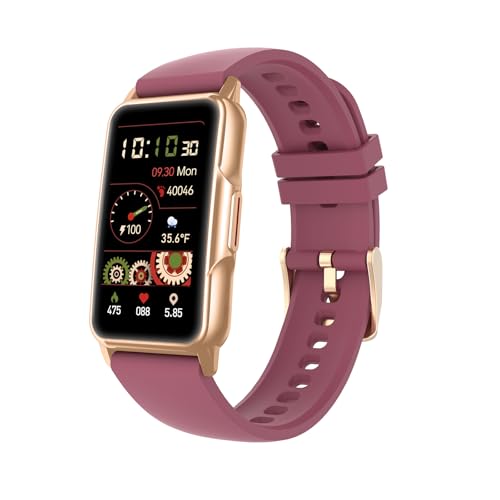


How continuous calorie burn estimation works: sensors and algorithms
Primary sensor inputs
Wearables combine multiple signals to estimate energy use. Common hardware includes:
Chest straps remain the gold standard for accurate beat-to-beat heart data during intervals and cycling; wrist PPG can lag or undercount during vigorous, irregular movement. Popular devices that illustrate these trade-offs include the Apple Watch / Garmin Forerunner (robust PPG + multisensor) and simpler bands like Fitbit Charge (smaller sensors, battery-efficient).
How sensors become calories: models and math
Devices translate signals into energy expenditure using several approaches:
Resting metabolic rate (RMR) is estimated from age, sex, height, weight, and sometimes fitness level using formulas (Mifflin–St Jeor, Harris–Benedict) and added to activity calories.
Practical accuracy notes & quick tips
Because estimates are indirect, expect activity-dependent error: steady cardio (running, cycling) is modeled well; resistance training and short intervals are harder. To improve readings: enter accurate personal data, wear the sensor snugly, use a chest strap for hard workouts, and enable specific activity modes when available.
Device categories compared: smartwatches, fitness bands, and dedicated wearables
Smartwatches: full-featured hubs
Smartwatches (Apple Watch, Garmin Forerunner, Samsung Galaxy Watch) pack multiple sensors, on-device processing, and rich apps. They’re built for daily wear and multitasking—notifications, mapping, and workouts—so calorie estimates are one of many features.
Quick tip: use built-in activity modes (run, bike) to improve calorie modeling.
Fitness bands: slim, battery-friendly trackers
Fitness bands (Fitbit Charge, Xiaomi Mi Band) trade screen real estate for long battery life and discreet shape. They focus on step/activity tracking and baseline calorie burn.
Dedicated wearables: purpose-built fidelity
Dedicated devices prioritize one measurement: chest straps (Polar H10) or chest ECG patches, WHOOP/ Oura-style bands and rings, and clip-ons.
Trade-offs & who benefits
Next, we’ll examine how accuracy varies by activity and what to watch for when interpreting continuous calorie streams.
Accuracy: what affects calorie estimates and common sources of error
Physiological variability
People aren’t averages. Heart rate to VO2 (oxygen uptake) relationships differ by genetics, fitness, and metabolic efficiency—two people running at the same HR can burn different kilocalories. Trained athletes often have lower HR for a given power output; older or less fit users may show the opposite. Tip: measure or enter your resting metabolic rate (RMR) when possible to anchor estimates.
Sensor limitations
Most wearables rely on PPG and accelerometers, and those sensors have clear failure modes: motion artifact, poor contact, darker skin tones, tattoos, and sweat all corrupt signals. Even the best wrist PPG (Apple Watch, Garmin) struggles during burpees or high‑intensity intervals.
Activity-type issues
Motion-based models excel at running/walking but misread cycling, rowing, weightlifting, and isometric work. Lifting heavy, static holds, or steep hill cycling can produce low wrist motion but high energy cost—so calorie estimates can undercount, sometimes substantially.
Algorithmic assumptions
Many devices use population-derived MET tables or HR-to-calorie regressions; they’re fast but generic. Personalized models—those that adapt to your data or allow chest-strap calibration—cut error by learning your true HR-VO2 curve. Devices with cloud ML may improve over time, but transparency varies.
Contextual and environmental influences
Placement and fit matter: a loose band creates noise; wearing on the dominant vs non-dominant wrist changes readings. Temperature, humidity, and altitude subtly affect skin perfusion and sensor contact. Battery-saving modes that sample less frequently reduce temporal fidelity and average out peaks.
Reducing error and realistic expectations
Practical steps: wear devices snugly, use activity modes, pair a chest strap (Polar H10) for workouts, occasionally calibrate with a lab VO2 or controlled bike test, and update firmware. Expect wearables to be excellent for trends and relative changes (weight loss progress, improved fitness) but not absolute kcal precision—treat continuous estimates as guidance, not a food-scale.
Next, we’ll look at battery, comfort, and privacy trade-offs that shape daily usability.
Practical considerations: battery, comfort, data continuity, and privacy
Battery life vs sampling fidelity
High-frequency heart-rate and motion sampling give the richest calorie curves but drain batteries fast. Typical trade-offs:
If a device offers “always-on” HR at 1s vs 10s intervals or reduced GPS logging, the former yields finer event peaks (HIIT, sprints) while the latter smooths spikes and underestimates short, intense effort. Battery-saver modes help runtime but reduce fidelity.
Comfort and wearability
A tracker you forget to put on is useless. Consider:
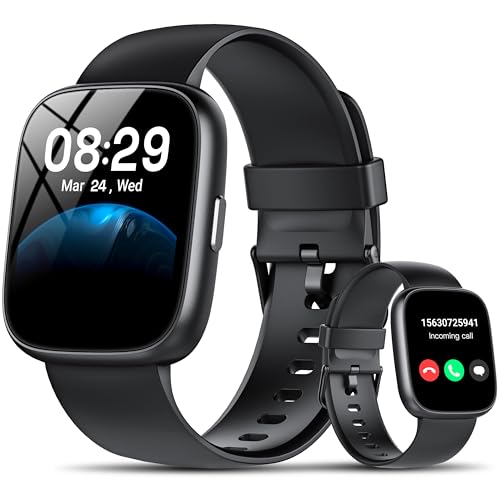
Data continuity: gaps and misclassification
Real-world gaps come from charging, deliberate removal, and sensor dropouts. Automatic sleep/activity detection can mislabel naps, long desk work, or cycling (low wrist motion) as low activity. These gaps bias daily totals and trend analyses—expect undercounts when you remove the device for showers or charging.
Data handling and privacy
Where and how data are processed matters:
Practical tips to maximize continuous quality
Making sense of continuous calorie data: context, trends, and integration
Read the numbers: RMR + active calories
Continuous calorie outputs are most useful when combined with a resting metabolic rate (RMR). Treat device “active calories” as the movement- and heart-rate driven portion; add your RMR (device-estimated or from an equation like Mifflin–St Jeor) to get a practical daily energy estimate. Devices present this as per-minute burn (fine-grain peaks), hourly summaries, and a daily total—use whichever timescale matches your question (meal planning: hourly; weight goals: daily/weekly).

Focus on trends, not single-session precision
A single workout can be off by 10–30%. Instead:
A runner who expected a 600 kcal burn after intervals may find their weekly trend shows fewer high‑intensity minutes—use that pattern to tweak training, not punish one session.
Integrate with nutrition and exercise logs
Practical steps:
Clean and deepen your data
How coaches, apps, and clinicians can use streams — and their limits
Coaches use trends to nudge behavior and tailor workouts; apps automate meal adjustments. Clinicians can monitor activity patterns but should not base metabolic diagnoses on wrist estimates alone—use lab measures for clinical decisions. Continuous streams are a powerful behavioral tool when interpreted thoughtfully and combined with other data.
Choosing and using a device: questions to ask and best practices
Quick checklist to choose the right device
Ask yourself the core question: what will you actually use continuous calories for?
Then evaluate form factor: smartwatch (Apple Watch, Garmin), band (Fitbit Charge, Xiaomi), or dedicated sensor (Oura, Whoop, ring). Decide if you need on‑wrist display or minimal distraction.
Sensor & validation priorities
Prioritize devices with well‑reviewed optical HR sensors or explicit chest‑strap compatibility (Polar H10 for accuracy). Look for:
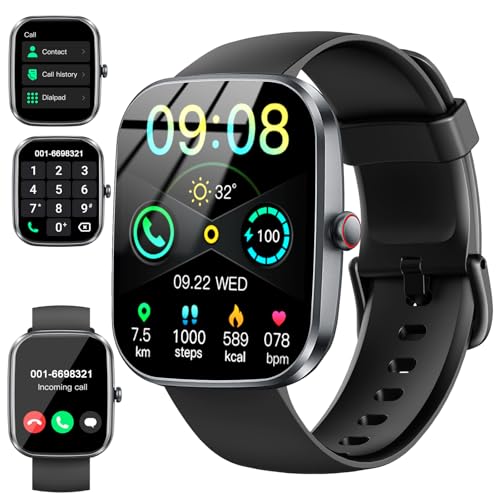
Setup and everyday best practices
When to trust — and when to doubt
Treat outputs as behavioral guidance: rely on week-to-week trends and percentage changes, not single-session totals. If numbers shift dramatically without behavior changes, recheck settings, placement, or firmware updates.
Next, we’ll bring these practical choices together and show how to put continuous calorie tracking to everyday use.
Putting continuous calorie tracking to practical use
Continuous calorie tracking uses heart rate, motion, and physiological sensors plus models; smartwatches offer richer sensors, bands trade features for battery, and dedicated devices focus narrowly. Accuracy hinges on sensor quality, algorithms, personal calibration and activity type; battery life, comfort, data continuity and privacy require practical trade‑offs. Treat continuous estimates as trend indicators to guide behavior change, not precise accounting. Choose a device that fits your priorities, calibrate and wear it, and interpret calorie trends alongside nutrition and activity goals.
Privacy alarm bells at the “1.91” AI Smartwatch with Built-in ChatGPT” mention. Like, do I really want my watch asking follow-ups about my snack choices out loud? 😂
On the tech side, I liked the section on sensors vs algorithms — seems like companies sometimes hide behind fancy model names when it’s just poor sensor fusion. Accuracy talk was good, but wish there were more numbers (error ranges) for each device category. Also, anyone else find the calorie numbers wildly different between your watch and gym treadmill?
Good callout, Tom. We avoided naming precise error numbers because variability across users and activities is huge, but ranges would be helpful — we’ll consider adding a data-driven table in a follow-up. As for AI watches and privacy, that’s why we emphasized privacy settings and local vs cloud processing.
Also: if you want concrete numbers, try a lab test or a VO2-based estimate. Consumer devices typically deviate by 10–30% depending on activity — we can add that caveat more prominently.
Treadmill calorie estimates are often garbage — they assume a standard body/metabolism. My watch (old band) underestimates intense intervals by like 20%, treadmill overestimates steady-state. I trust chest-strap + calibrated device most.
Tom — the ChatGPT watch sounds cool but also creepy. If the AI is on-device, less scary. If it uploads everything to the cloud, yeah meh. 🤖🔒
Loved the device comparison bit. Quick notes from a serial gadget buyer: the 1.58″ HD Smart Fitness Watch 120 Modes felt like a decent middle ground — nicer screen than the tiny bands, but not so heavy that I refused to sleep with it. Also tried a 1.91″ 2026 Smartwatch with Bluetooth Calling — battery was meh. 😅
Accuracy-wise, I noticed the biggest errors during strength training and weightlifting — the watch thinks you’re just chilling because wrist movement is different. Anyone else see that? So yeah, if you do a lot of lifting, consider a chest strap or manually log those sessions.
Also yea the 1.58″ has way better battery than the 1.91″ 2026 I tried. Weird tradeoffs with these budget models.
Battery vs features is a recurring tradeoff we highlight. If continuous tracking is your priority, prioritize battery life and comfort over flashy screens.
Pro tip: If your device supports it, set a strength-training profile so the algorithm at least tries to interpret the movement differently — some watches do this and it helps a bit.
Good point about resistance training — most calorie models are tuned for aerobic activities. We mentioned manual logging and activity-type tagging for precisely this reason.
Yep — my gym app + watch combo always undercounts lifting. I started using perceived exertion + duration and then manually adjust calories. Not ideal, but better than nothing.
Nice article. Quick practical tip: for everyday tracking I switched to a 1.10″ AMOLED Fitness Tracker 25 Modes because it’s light and I barely notice it while sleeping. The continuous data is less “accurate” vs a chest strap, but the longer wear time gave me much better trend info.
Comfort > theoretical precision for me — if you don’t wear it, it’s useless.
Totally agree — we emphasized that in the Practical considerations section. Continuous, slightly-less-accurate data beats sporadic high-accuracy snapshots for lifestyle decisions.
100% — I bought a bulky watch once and stopped wearing it after a week. Switched to a band and my data consistency skyrocketed. Trends > exact kcal numbers imo.
Great deep-dive — thanks! I’ve been using a Polar H10 chest strap during workouts for a while and it’s wild how much smoother the calorie estimates look compared to my old wristwatch. Chest straps still feel like the gold standard for heart-rate driven burn.
That said, the article’s point about context/trends is spot on: day-to-day spikes don’t mean much unless you link them to sleep, food, and stress. Battery and comfort section was super useful — I swapped from a bulky watch to a slim band for sleep tracking and the continuity improved a lot.
Curious if anyone here pairs a Polar H10 with an inexpensive smartwatch (like the 1.47″ HD Smart Fitness Watch 115 Modes) and how that combo performed for them?
I do that exact combo — Polar H10 + cheap 1.47″ watch. Works fine for steady cardio but sometimes the watch app loses the BLE connection during long runs. If you’re doing interval stuff, the belt is great, otherwise a decent optical sensor on a higher-end watch is fine.
Thanks for sharing your experience, Lisa — exactly the kind of real-world perspective we hoped readers would add. Many users pair chest straps with budget watches to boost accuracy; just watch out for connection dropouts during GPS-heavy activities.
Also worth noting: chest straps measure heart rate more directly, but the algorithm on the watch matters. If the watch can accept an external HR input, you’ll generally see better calorie estimates than the watch using its own optical sensor.
Really useful breakdown of making sense of continuous calorie data. I struggle with integrating watch data into my nutrition plan — my 1.91″ AI Smartwatch with Built-in ChatGPT tells me calories burned, but my nutrition app (and coach) uses different numbers.
Question: any recommended workflow for reconciling device calories with a coach’s targets? Also thinking of adding a Polar H10 for workouts — will that help make the calorie numbers more “actionable” or just more confusing? Thanks!
Good question. Short answer: pick one consistent source for daily guidance (either your coach’s calibrated targets or a single device) and use trends from others as context. Adding a Polar H10 will likely improve workout calorie estimates, making the device data more trustworthy; but sync/merge rules between apps can still cause differences.
Also: if you want tighter alignment, have your coach do a baseline calibration (resting metabolic rate or a measured session) and then adjust device outputs by a multiplier. It’s clunky but it reduces surprise deviations.
I told my coach to ignore device kcal and focus on trend + weight + performance. We used the watch data to spot anomalies (like unusually high burn days) not to set exact calorie budgets. Worked well for me.