Why high-accuracy heart rate matters for cycling power zones
A single beat can change a training block. Heart rate is a powerful but imperfect proxy for cycling power. It lags, drifts with fatigue, and shifts with heat or hydration.
When we use heart rate to define or supplement power zones, accuracy matters. Inaccurate HR data can misplace your zones, distort intensity, and undermine progress. High-accuracy monitors reduce noise and help you see true physiological responses.
This article shows how precise heart rate measurement supports reliable zone mapping, practical adjustments, and smarter workouts. With better HR data you can train more consistently, avoid wasted efforts, and turn physiological signals into meaningful power-zone gains. Read on to unlock actionable strategies and tools.
Power vs Heart Rate: Low vs High Intensity Training with Dr. Stephen Seiler
1
Fundamentals: heart rate, power zones, and how they relate
What are power zones and common HR frameworks
Power zones (commonly the 7-zone Coggan system or a simpler 5-zone model) slice your cycling outputs by functional intensity — from easy endurance to all-out neuromuscular efforts. Heart rate zones are usually expressed as percentages of HRmax or heart-rate reserve (Karvonen method) and are framed around physiological anchors: easy aerobic, tempo, threshold, VO2max, and sprint zones.
How heart rate maps to physiology
Heart rate is an internal measure: it reflects cardiovascular demand, not mechanical output. Key physiological links to remember:
Metabolic thresholds: lactate threshold/FTP aligns closely with sustained HR ranges — your “threshold” heart rate is a robust marker for long, steady efforts.
Cardiovascular response: HR rises with oxygen demand, influenced by stroke volume, autonomic state, heat, and hydration.
Lag and drift: HR typically lags power by 15–30 seconds during ramps and intervals, and can drift upward (cardiac drift) over prolonged exertion or heat, even if power is constant.
A useful rule of thumb: power = what you do; heart rate = how your body responds.
Where HR complements power — and where it doesn’t
Heart rate is most helpful when the signal is stable or when internal load matters.
Helpful situations:
Long endurance rides and ultras, where power fluctuates with terrain but steady HR indicates sustainable effort.
Recovery and easy days: HR makes it easy to ensure you truly stay aerobic.
Fatigue monitoring across a week: shifting HR at a given power flags accumulated stress.
Limitations:
Short maximal efforts and sprints — HR is too slow to reflect instantaneous output.
Highly variable intervals — power is the precise control tool; HR will catch up afterward.
Practical starter tips
Establish HRmax and resting HR with simple field tests or by incremental testing; these anchor zone calculations.
Warm up before measuring threshold heart rates; avoid cold-start readings.
Pair HR with power: treat HR as confirmation and a fatigue sensor, not a replacement.
Editor's Choice
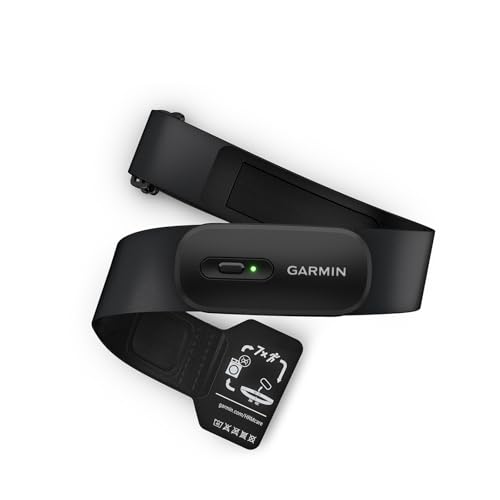
Garmin HRM 200 Accurate Machine-Washable Heart Monitor
Accurate HR and HRV, long battery life
A chest heart rate monitor that transmits precise real-time heart rate and HRV data to compatible Garmin devices, apps, and gym equipment. It features a comfortable, machine-washable strap, a user-replaceable battery with up to one year of life, and a durable water-resistant design.
Next you’ll learn how to judge “high-accuracy” in heart rate devices so you can choose tools that make these fundamentals actionable and trustworthy for training.
2
What 'high-accuracy' means for heart rate monitors and how to evaluate devices
Key objective measures of accuracy
Think of HR accuracy as quantifiable, not just “it looks right.” Important metrics:
Sampling rate: how often the sensor records HR. Higher sampling (≥250 Hz for ECG; >25 Hz for PPG) captures fast changes and reduces smoothing that hides interval peaks.
Validation metrics: mean error (bias), root mean square error (RMSE) for overall deviation, and agreement analyses (e.g., Bland–Altman) vs. a reference ECG. RMSE under ~5 bpm and small bias are typical targets for fitness-grade devices.
Latency and smoothing: how much the device filters or averages readings. Excessive smoothing reduces noise but blunts short efforts and threshold transitions.
These are the measurements lab studies use — look for them in product specs, white papers, or independent tests.
Sensor technology and practical trade-offs
ECG/chest straps (Polar H10, Garmin HRM-Pro): record electrical heart activity, high sampling, low latency, and strong agreement with laboratory ECG — the gold standard for cycling intervals and threshold work. They can be slightly uncomfortable but excel in motion-rich scenarios.
Optical PPG (wrist/arm devices): convenient (Garmin/Venu series, Apple Watch), but prone to motion artifacts, poor contact, and cadence-induced noise during hard efforts. Advances in multi-wavelength LEDs and algorithms have improved accuracy; still, expect occasional spikes or missed peaks during sprints.
Best Value
AMOLED Fitness Smartwatch with Health Tracking
24/7 HR, SpO2, sleep and activity tracking
A budget-friendly smartwatch offering continuous heart rate, blood oxygen, blood pressure, temperature, and sleep monitoring plus 25+ sport modes to track activity and steps. It has a 1.10-inch AMOLED touchscreen, smart notifications, and syncs data to the companion app for easy health insights.
Real-world notes: sweat can both improve chest-strap contact and cause slippage; tight, consistent placement reduces PPG artifacts; high-cadence or rough roads expose weaknesses in many wrist sensors.
Connectivity: ANT+ is preferred for stable, multi-device bike setups (head unit + trainer); Bluetooth LE is ubiquitous for phones and watches. Choose devices that support the protocols you plan to use simultaneously.
Battery life: chest straps can last months; optical watches often last 1–7 days depending on features. Low battery can trigger sampling or transmission changes.
Firmware: vendors regularly update signal processing and artifact rejection. Confirm active firmware support and a history of updates.
Quick checklist for purchase or trial rides
Confirm reported sampling rate and protocol support (ANT+, BT).
Compare live readings to a trusted chest strap or a lab ECG during: rest, steady threshold effort, short sprints, and a prolonged ride (to check drift).
Watch for dropouts or lag during cadence changes and rough roads.
Test battery endurance and check whether firmware updates are frequent and documented.
Next, we’ll use these accuracy principles to reliably map heart-rate data into cycling power zones and adjust for real-world lag and drift.
3
Mapping high-accuracy heart rate to cycling power zones: methods and adjustments
Step 1 — Establish baselines (power and HR)
Start with a reliable power baseline (FTP or functional threshold power) and a corresponding threshold heart rate (LTHR). Practical field options:
20-minute time trial: take 95% of the 20-min average as FTP; use the average HR during the final 20-minute steady block as LTHR.
Two 8–12 minute maximal efforts (2×8 min): average HR of the harder interval approximates LTHR and is less fatiguing than a 20-min TT.For lab-grade precision, pair an incremental lactate test or ramp test with ECG (e.g., Polar H10 or Garmin HRM-Pro as chest-strap references).
Step 2 — Convert zones: percent-LTHR or heart-rate-reserve (HRR)
Two practical mapping methods:
Percent of LTHR: many coaches use LTHR as the anchor (e.g., Zone 2 ≈ 85–95% LTHR, Zone 3 ≈ 95–105% LTHR) — more physiologically consistent than HRmax percentages.
Heart-rate-reserve (HRR): good when LTHR is unknown. Compute target = HRrest + %*(HRmax − HRrest). HRR aligns better with perceived effort across fitness levels.Tip: use LTHR for endurance/threshold work and HRR for general fitness pacing.
Step 3 — Account for HR lag and drift
Heart rate lags power changes by ~15–40 seconds and drifts upward during long efforts in heat or with dehydration.
For intervals <2 minutes: prioritize power targets; HR will under-report intensity.
For steady efforts >10 minutes: use HR as a reliable guide but expect +3–8 bpm drift in hot or fatigued states.Compensation strategies: target slightly lower HR early in heat, or use rolling 3–5 minute average HR for zone fidelity.
Temperature/humidity: reduce HR targets by 3–7 bpm in hot conditions or use perceived exertion alongside HR.
Hydration and nutrition: dehydration can raise HR at the same power — rehydrate before key sessions.
Cadence: low cadence (e.g., <70 rpm) often raises HR for the same power; adjust HR targets upward if you’re climbing in low cadence.
Fatigue and caffeine: expect elevated HR for equivalent power on heavy fatigue or stimulants.
Conservative HR-based targets and validation rides
To reduce misclassification:
Widen HR bands by ±3–5 bpm versus strict cutoffs.
Require sustained HR within the band for 60–90 seconds before confirming zone.Recommended quick validation rides:
20-min FTP/LTHR test (as above).
“HR mapping” ride: 5–10 minute steady efforts at target power for Zones 2–4, logging mean HR.
Short ramp/interval test (10 min easy / 10 min hard) to observe lag and drift.Use a chest strap (Polar H10, Garmin HRM-Pro, Wahoo TICKR X) as a reference on the first mapping session, then apply refined HR targets in training.
Next, we’ll use these mapped targets to design practical, zone-based cycling sessions that leverage accurate HR data for consistent performance gains.
4
Designing and executing zone-based cycling training using accurate HR data
Structuring intervals: when to follow HR vs. power
For short, high-intensity efforts (<2 minutes) use power as the primary control — HR will lag. For efforts from 5–20 minutes, let HR guide pacing because it reflects metabolic stress better than instantaneous power. A practical rule: start intervals to power, finish to HR. If your HR is not reaching the mapped zone by the third minute of a 10-minute threshold interval, you’re likely underfueled or pacing too conservatively.
Best for Accuracy
moofit HR8 Chest Strap Bluetooth Heart Monitor
Accurate ±1 bpm, Bluetooth 5.0 and ANT+
A low-energy chest strap heart rate monitor that delivers high-accuracy readings (about ±1 bpm) and long communication range using Bluetooth 5.0 and ANT+. Lightweight, IP67 sweatproof, with adjustable replacement straps and a long-life replaceable CR2032 battery for extended use.
Use steady-state (Zone 2–3) rides to accumulate aerobic minutes without excessive load. Keep these rules in mind:
Ride to the upper bound of Zone 2 but stop short of the HR rise that signals threshold drift.
Monitor 3–5 minute rolling average HR to avoid reacting to transient spikes.
On “low-power” or recovery days, autoregulate: if HR is 6–10 bpm above your usual Zone 2 at the same easy power, cut duration by 20–40% or convert to an active recovery spin.
Managing cumulative fatigue with HR trends
Heart rate is a sensitive marker of accumulated stress. Simple heuristics that work in the field:
If overnight resting HR is 4–6 bpm elevated for 2–3 days, shift sessions down one zone.
If HR at a given power drifts up progressively across a week (+3–5 bpm), schedule an easier microcycle.Use a brief “check” — 5 minutes at a familiar easy power — to gauge fatigue before key workouts.
Integrating HR with power and perceived exertion
Blend three inputs for smarter adjustments:
Power: objective, best for short intervals.
HR: slow, reliable for sustained metabolic strain.
RPE: rapid feedback when devices disagree.If power hits target but HR and RPE feel high, shorten intervals or add extra recovery.
Sample workouts and progression tips
Zone 2 aerobic: 90 minutes at upper Zone 2 (3–5 min rolling HR in zone).
Sweetspot builder: 3×12 min sweetspot (88–93% FTP) with HR target ~95–100% LTHR, 6 min recovery.
Threshold repeat: 2×20 min at threshold power; pace to power then monitor HR to stay within ±3 bpm of LTHR.
Coaching tips:
Re-map LTHR every 4–8 weeks or after a clear training block.
Widen HR bands by ±3 bpm on very hot or high-fatigue days.
Keep a short “validation” protocol (10 min easy / 10 min hard) to quickly recalibrate targets before races or training camps.
5
Analyzing and integrating heart rate data with power for long-term training gains
Cleaning and preprocessing HR data
Start with simple, repeatable steps so your analytics are reliable:
Apply a rolling average to smooth noise — 5–15 seconds for interval work, 30–60 seconds for steady-state/time-in-zone analysis.
Reject obvious artifacts: remove single-point spikes (e.g., >12–15 bpm jump in 1–2s) and interpolate across short dropouts (<10–15s). Longer gaps should be flagged, not auto-filled.
Align timestamps and resample to a common rate (1s is standard) before merging with power.
Anecdote: a club rider once blamed a bad interval session on “poor fitness” — it was a loose chest strap producing 20s dropouts that inflated his perceived recovery. Clean data would have saved him a wasted session.
A dual ANT+ and Bluetooth chest strap that pairs reliably with Garmin, Wahoo, Peloton, Polar, and 400+ fitness apps and devices while offering clinical ±1 bpm accuracy. It uses a soft, chafe-free strap for all-day comfort, is sweatproof, and runs 400+ hours on a replaceable battery.
Export both FIT/TCX/CSV files and import into a single platform (TrainingPeaks, WKO, Golden Cheetah, Final Surge). These platforms auto-sync by timestamp if both devices used the same clock.
If files misalign, use FIT file tools (e.g., FitFileTools) to shift timestamps or resample to 1s.
When using third-party apps (Strava, Sufferfest), upload the primary power device FIT first, then attach HR as an additional file or merge before upload to preserve both streams.
Product tip: chest straps with ANT+ + Bluetooth (Garmin HRM-Pro, Polar H10, Wahoo Tickr X, Powr Labs) give flexible pairing to bike computers and phones.
Time-in-zone (HR zones): tracks aerobic minutes even when power is low (e.g., long climbs).
HRV trends and resting HR: morning HRV drops or elevated resting HR signal accumulating fatigue.
Fatigue indicators: progressive HR drift at steady power, slower HR recovery post-intervals, and higher HR for given wattage.
Interpretation rule-of-thumb: trust power for sprints and short intervals (<2–3 min); trust HR for metabolic load, recovery and multi-hour pacing. If HR and power disagree persistently (HR >5 bpm above historical for the same power), suspect heat, hydration, illness, or overreaching — dial back and monitor HRV/resting HR.
Calibration, maintenance and troubleshooting
Retest thresholds every 4–8 weeks (FTP ramp or 20–60 min field test; LTHR checks).
Maintain sensors: rinse and dry chest straps, replace electrodes/batteries annually, keep firmware up to date.
Common fixes: clean contacts for dropouts, re-pair devices for weird readings, use FIT repair tools for corrupted files, and check for double-paired ANT+/BT conflicts.
Keeping data clean, devices tuned, and metrics contextualized turns months of rides into actionable progress. Next, we’ll synthesize these practices into a practical playbook to unlock power-zone performance in everyday training.
Putting it together: using accurate heart rate to unlock power-zone performance
Investing in high-accuracy heart rate monitoring pays off when you use power zones: validated devices give trustworthy physiological context, enabling precise mapping, smarter pacing, and better fatigue management. Validate sensors against known benchmarks, apply individualized HR-to-power mapping, and adjust for conditions like heat, hydration, and recovery so heart rate becomes a reliable complement to power rather than a noisy distraction.
Consistent data practices — regular calibration, thoughtful session notes, and paired HR/power analysis — let you monitor trends, refine zone thresholds, and make informed training or recovery decisions. Start by validating your monitor and committing to disciplined data habits to unlock power-zone potential.
Wrist-based HR on my AMOLED Fitness Smartwatch is okay for commuting but during intervals it lags like crazy. Frustrating when I’m trying to hold TSS and hit zones precisely.
I liked the article’s point about evaluating device accuracy — never realized you should compare to a pedal power meter instead of relying on watch readouts.
Still, wrist sensors are convenient. Tradeoffs I guess.
Yep, wrist sensors tend to lag and can be affected by vibration and wrist position. For intervals and zone work we recommend a chest strap like moofit HR8 or the Powr Labs for best real-time fidelity.
Priya Patel
on October 17, 2025
Agreed. I switched to chest strap for workouts and keep the AMOLED for everyday tracking. Best of both worlds.
Zoe Kim
on October 17, 2025
Long-term analysis tip: export HR and power data monthly and look for 3 trends: resting HR baseline, HR at sub-threshold workouts, and HR drift on long rides.
If resting HR creeps up AND your power at a given HR drops, it’s usually a sign to back off. The article’s integration tips are great — but I also recommend a simple spreadsheet to track paired HR/power medians.
Been doing this for a year and it helped me avoid a big overtraining dip.
Kevin O'Neil
on October 18, 2025
Some head units and apps have auto-export hooks via 3rd-party tools. Worth investigating if you want to scale the workflow.
Linda Park
on October 18, 2025
Do you automate CSV exports? I want to do this but manual export is a pain.
Nice practical workflow, Zoe. Tracking those three metrics is an effective early-warning system. Spreadsheets work great for hobbyists before moving to platforms like TrainingPeaks.
Kevin O'Neil
on October 23, 2025
Favero Assioma Uno versus other pedal meters: I’ve noticed pedal-based meters are great for consistent readings if cleats are set right. The article’s device evaluation checklist helped me decide. A few notes:
– Calibrate zero offset regularly
– Watch pedal thread torque
– Firmware matters
Anyone else switching pedals between bikes and seeing consistency issues?
Yes — pedal swapping can introduce small offsets if torque settings differ. Re-zero/calibrate after swapping and check L/R balance if applicable.
Emma Wilson
on October 23, 2025
Don’t forget platform/wrap on the shoe too. Slight differences can alter the power reading marginally.
Priya Patel
on October 24, 2025
Firmware updates fixed a weird drift for me. Favero support was helpful.
Jacob Rivera
on October 24, 2025
I swapped my Assioma between bikes and noticed ~1% difference. Recalibrating fixed it.
Michael Hart
on October 23, 2025
The AMOLED Fitness Smartwatch surprised me — decent daytime HR and the app overlay made it easier to spot trends. But still not for intervals. Solid for daily HR baselines though.
Exactly — smartwatches are great for baseline trends and lifestyle metrics, chest straps are still preferred for training specificity.
Zoe Kim
on October 23, 2025
I use the AMOLED watch for sleep HR and the moofit chest for sessions. Best of both worlds.
Priya Patel
on October 24, 2025
Question for anyone who mapped HR to power zones: do you generally use percentage of FTP to define power zones and then map HR by looking at steady-state efforts for each zone? The article touched on methods but I’d love a simple step-by-step that works for a 40–50 minute ride.
David Chen
on October 24, 2025
Also consider HR drift over long efforts — use shorter steady blocks to avoid skew. If you have RPE, record that too; it helps when HR is noisy.
Emma Wilson
on October 24, 2025
I add a warmup and cool-down buffer and avoid using the first 2 minutes of each steady block. Works well for me.
Yes — start with FTP-based power zones, then do 1–2 steady efforts in each zone (8–20 min) while recording HR. Use the median HR during steady parts to set HR thresholds. Remember to retest every 6–8 weeks and adjust for fatigue/heat.
Jacob Rivera
on October 25, 2025
If your chest strap supports dual-mode (ANT+/Bluetooth), you can stream to bike head unit and phone simultaneously to cross-check power and HR in real time.
David Chen
on October 26, 2025
Nice read. A technical point: beat-to-beat HRV and instantaneous heart rate smoothing methods can change the visible HR response during short intervals. The article mentions HR smoothing but I’d add: check if your head unit applies smoothing and be conservative with very short intervals (<2 min) if using HR alone.
Kevin O'Neil
on October 26, 2025
Also make sure firmware is up-to-date on the HR strap. Manufacturers tweak smoothing in updates sometimes.
Good call — device smoothing and algorithmic filtering vary widely. That’s why cross-checking with a power meter like Favero helps for short efforts.
Sarah Lee
on October 27, 2025
Totally — my head unit had smoothing on by default and my HR looked like a cartoon. Turned it off and got cleaner data.
Chris Morgan
on October 31, 2025
Used the HR+power combo on a crit warmup and it was clutch — kept me honest, didn’t blow up, and hit my race watts. The article’s closing line about ‘unlocking power-zone performance’ is spot on. Race-day consistency > adrenaline power spikes.
Kevin O'Neil
on October 31, 2025
Don’t forget temp and elevation changes — they shift HR. Account for that pre-race.
Sarah Lee
on October 31, 2025
Same — HR helped me hold back during the early surges. Less suffering later!
Nice to hear it worked in practice, Chris. Pre-race pacing using mapped HR zones can keep you in control when everyone else is redlining.
Laura Brooks
on November 2, 2025
Quick practical q: the article says Garmin HRM 200 is machine-washable — does that mean I can toss the strap in with my jersey laundry or do I need to remove the pod? I don’t want to ruin it.
Tom Garcia
on November 2, 2025
I always hand-wash mine on low temp but yup, remove the pod. Learned that the hard way once 😂
Remove the transmitter pod first — usually the strap fabric is washable but check the manual. The HRM 200 strap itself can be machine-washed gently but the electronics should be hand-wiped.
Alice Bennett
on November 5, 2025
Loved the article, but a few nitpicks: sometimes the device-comparison section felt a bit like a shopping list instead of telling me how to choose for my specific use-case. Also, the moofit HR8 is cheap and accurate but it’s a bit fiddly to strap on correctly.
Anyways, great read overall — gave me ideas for my winter base training. Gonna try the HR+power mapping next week. 💪
ps: typo on page 4? ‘reccomended’ lol
Tom Garcia
on November 5, 2025
Haha the typo made me feel better about my own writing 😂
Thanks, Alice — good catch on the typo, we fixed that. And fair point about device comparisons: we’ll add a quick decision tree in the update to help pick devices by use-case (intervals, commuting, racing, multisport).
Laura Brooks
on November 5, 2025
Agreed about moofit — snug is good but not painful. Took a couple rides to get comfy.
Chris Morgan
on November 6, 2025
Decision tree would be awesome. I’m indecisive and that would save me hours of forum reading.
Priya Patel
on November 6, 2025
If you try the mapping next week, post your results — curious how it goes for you!
Emma Wilson
on November 14, 2025
Really appreciated the ‘Designing and executing zone-based cycling training’ section. I built a 6-week microcycle using HR + power and saw consistent improvements. A few notes from my experience:
1) Use HR to backstop power when days are stressful or hot.
2) Keep the first 2 weeks conservative to let HR zones settle.
3) Use tools (TrainingPeaks/Strava) to overlay HR and power to see when they decouple.
Would love templates for interval sessions based on HR-mapped zones.
Priya Patel
on November 15, 2025
Would love those templates too. I keep losing track of when to adjust training load based on chronic HR trends.
Kevin O'Neil
on November 15, 2025
Also, remember hydration and caffeine can shift HR. If HR is off, consider those factors before changing zones.
Laura Brooks
on November 15, 2025
Emma — did you use a Favero Assioma Uno or a different power meter? Curious about pedal-based differences.
Nice summary — templates are on our list for a follow-up post. Meanwhile, try 3×10′ at Zone 3 power mapped to corresponding HR (with 5′ recovery). Adjust intensity if HR is >4 bpm higher than expected during the block.
Tom Garcia
on November 17, 2025
LOL chest straps are the worst for comfort but man they never lie. Tried a moofit HR8 and the accuracy was legit — just had to get over the feeling of wearing a tiny seatbelt on my chest 😂
Powr Labs backup strap is great when the main one dies mid-ride. Yay for redundancy!
Emma Wilson
on November 17, 2025
Try using a thin base layer under the strap — helps with chafing and sweat buildup without sacrificing accuracy.
Comfort is the main complaint with chest straps, for sure. The tradeoff is accuracy/stability. The article recommends machine-washable or skin-friendly materials if you’re sensitive.
Linda Park
on November 17, 2025
Short tip: Favero Assioma Uno is rechargeable and the battery life is surprisingly good. I charge between big rides and it lasts for weeks. The article’s mention about keeping a backup strap is legit though — never trust one device on race day.
David Chen
on November 17, 2025
And check firmware — some charge/health indicators are only accurate after an update.
Exactly — redundancy is key on race day. Pedal meters with rechargeable batteries are convenient, just keep a charging cable in your kit bag.
Tom Garcia
on November 18, 2025
I once forgot the cable and panicked at packet pickup. Now I keep a spare in the car 😅
Priya Patel
on November 19, 2025
Good call. Also check the charge before race week — batteries can degrade slowly.
Sarah Lee
on November 21, 2025
Great article — finally someone explaining how accurate HR makes a difference when you’re trying to hold specific power zones. I’ve been using a Favero Assioma Uno pedals + Garmin HRM 200 and the pairing feels solid. The section on mapping HR to zones helped me tweak my FTP-based zones better. Thanks!
Mark Thompson
on November 21, 2025
Which model of Garmin? I keep hearing HRM 200 is machine-washable — did you actually throw it in the laundry? 😅
Laura Brooks
on November 22, 2025
I’ve got the same setup, Sarah. Do you ever see HR drift late in long rides? I started carrying the Powr Labs as a backup.
Glad it helped, Sarah — pairing a power meter on the pedals with a reliable chest strap is a combo we see work very consistently. If you want, share one of your zone maps and we can comment on adjustments.
Jacob Rivera
on November 28, 2025
Anyone had trouble pairing Powr Labs Dual-Mode Chest Strap with both bike computer and phone simultaneously? I want to stream ANT+ to my head unit and Bluetooth to my phone but sometimes it drops.
Michael Hart
on November 28, 2025
I pair to the head unit first too. If it struggles, restart both devices — oddly that usually fixes it.
Dual-mode straps should support broadcasting to both, but some devices monopolize the connection. Try pairing to the head unit first, then to the phone; also check for firmware updates on the strap.





Wrist-based HR on my AMOLED Fitness Smartwatch is okay for commuting but during intervals it lags like crazy. Frustrating when I’m trying to hold TSS and hit zones precisely.
I liked the article’s point about evaluating device accuracy — never realized you should compare to a pedal power meter instead of relying on watch readouts.
Still, wrist sensors are convenient. Tradeoffs I guess.
Yep, wrist sensors tend to lag and can be affected by vibration and wrist position. For intervals and zone work we recommend a chest strap like moofit HR8 or the Powr Labs for best real-time fidelity.
Agreed. I switched to chest strap for workouts and keep the AMOLED for everyday tracking. Best of both worlds.
Long-term analysis tip: export HR and power data monthly and look for 3 trends: resting HR baseline, HR at sub-threshold workouts, and HR drift on long rides.
If resting HR creeps up AND your power at a given HR drops, it’s usually a sign to back off. The article’s integration tips are great — but I also recommend a simple spreadsheet to track paired HR/power medians.
Been doing this for a year and it helped me avoid a big overtraining dip.
Some head units and apps have auto-export hooks via 3rd-party tools. Worth investigating if you want to scale the workflow.
Do you automate CSV exports? I want to do this but manual export is a pain.
Nice practical workflow, Zoe. Tracking those three metrics is an effective early-warning system. Spreadsheets work great for hobbyists before moving to platforms like TrainingPeaks.
Favero Assioma Uno versus other pedal meters: I’ve noticed pedal-based meters are great for consistent readings if cleats are set right. The article’s device evaluation checklist helped me decide. A few notes:
– Calibrate zero offset regularly
– Watch pedal thread torque
– Firmware matters
Anyone else switching pedals between bikes and seeing consistency issues?
Yes — pedal swapping can introduce small offsets if torque settings differ. Re-zero/calibrate after swapping and check L/R balance if applicable.
Don’t forget platform/wrap on the shoe too. Slight differences can alter the power reading marginally.
Firmware updates fixed a weird drift for me. Favero support was helpful.
I swapped my Assioma between bikes and noticed ~1% difference. Recalibrating fixed it.
The AMOLED Fitness Smartwatch surprised me — decent daytime HR and the app overlay made it easier to spot trends. But still not for intervals. Solid for daily HR baselines though.
Exactly — smartwatches are great for baseline trends and lifestyle metrics, chest straps are still preferred for training specificity.
I use the AMOLED watch for sleep HR and the moofit chest for sessions. Best of both worlds.
Question for anyone who mapped HR to power zones: do you generally use percentage of FTP to define power zones and then map HR by looking at steady-state efforts for each zone? The article touched on methods but I’d love a simple step-by-step that works for a 40–50 minute ride.
Also consider HR drift over long efforts — use shorter steady blocks to avoid skew. If you have RPE, record that too; it helps when HR is noisy.
I add a warmup and cool-down buffer and avoid using the first 2 minutes of each steady block. Works well for me.
Yes — start with FTP-based power zones, then do 1–2 steady efforts in each zone (8–20 min) while recording HR. Use the median HR during steady parts to set HR thresholds. Remember to retest every 6–8 weeks and adjust for fatigue/heat.
If your chest strap supports dual-mode (ANT+/Bluetooth), you can stream to bike head unit and phone simultaneously to cross-check power and HR in real time.
Nice read. A technical point: beat-to-beat HRV and instantaneous heart rate smoothing methods can change the visible HR response during short intervals. The article mentions HR smoothing but I’d add: check if your head unit applies smoothing and be conservative with very short intervals (<2 min) if using HR alone.
Also make sure firmware is up-to-date on the HR strap. Manufacturers tweak smoothing in updates sometimes.
Good call — device smoothing and algorithmic filtering vary widely. That’s why cross-checking with a power meter like Favero helps for short efforts.
Totally — my head unit had smoothing on by default and my HR looked like a cartoon. Turned it off and got cleaner data.
Used the HR+power combo on a crit warmup and it was clutch — kept me honest, didn’t blow up, and hit my race watts. The article’s closing line about ‘unlocking power-zone performance’ is spot on. Race-day consistency > adrenaline power spikes.
Don’t forget temp and elevation changes — they shift HR. Account for that pre-race.
Same — HR helped me hold back during the early surges. Less suffering later!
Nice to hear it worked in practice, Chris. Pre-race pacing using mapped HR zones can keep you in control when everyone else is redlining.
Quick practical q: the article says Garmin HRM 200 is machine-washable — does that mean I can toss the strap in with my jersey laundry or do I need to remove the pod? I don’t want to ruin it.
I always hand-wash mine on low temp but yup, remove the pod. Learned that the hard way once 😂
Remove the transmitter pod first — usually the strap fabric is washable but check the manual. The HRM 200 strap itself can be machine-washed gently but the electronics should be hand-wiped.
Loved the article, but a few nitpicks: sometimes the device-comparison section felt a bit like a shopping list instead of telling me how to choose for my specific use-case. Also, the moofit HR8 is cheap and accurate but it’s a bit fiddly to strap on correctly.
Anyways, great read overall — gave me ideas for my winter base training. Gonna try the HR+power mapping next week. 💪
ps: typo on page 4? ‘reccomended’ lol
Haha the typo made me feel better about my own writing 😂
Thanks, Alice — good catch on the typo, we fixed that. And fair point about device comparisons: we’ll add a quick decision tree in the update to help pick devices by use-case (intervals, commuting, racing, multisport).
Agreed about moofit — snug is good but not painful. Took a couple rides to get comfy.
Decision tree would be awesome. I’m indecisive and that would save me hours of forum reading.
If you try the mapping next week, post your results — curious how it goes for you!
Really appreciated the ‘Designing and executing zone-based cycling training’ section. I built a 6-week microcycle using HR + power and saw consistent improvements. A few notes from my experience:
1) Use HR to backstop power when days are stressful or hot.
2) Keep the first 2 weeks conservative to let HR zones settle.
3) Use tools (TrainingPeaks/Strava) to overlay HR and power to see when they decouple.
Would love templates for interval sessions based on HR-mapped zones.
Would love those templates too. I keep losing track of when to adjust training load based on chronic HR trends.
Also, remember hydration and caffeine can shift HR. If HR is off, consider those factors before changing zones.
Emma — did you use a Favero Assioma Uno or a different power meter? Curious about pedal-based differences.
Templates = yes please. 😭
Nice summary — templates are on our list for a follow-up post. Meanwhile, try 3×10′ at Zone 3 power mapped to corresponding HR (with 5′ recovery). Adjust intensity if HR is >4 bpm higher than expected during the block.
LOL chest straps are the worst for comfort but man they never lie. Tried a moofit HR8 and the accuracy was legit — just had to get over the feeling of wearing a tiny seatbelt on my chest 😂
Powr Labs backup strap is great when the main one dies mid-ride. Yay for redundancy!
Try using a thin base layer under the strap — helps with chafing and sweat buildup without sacrificing accuracy.
Comfort is the main complaint with chest straps, for sure. The tradeoff is accuracy/stability. The article recommends machine-washable or skin-friendly materials if you’re sensitive.
Short tip: Favero Assioma Uno is rechargeable and the battery life is surprisingly good. I charge between big rides and it lasts for weeks. The article’s mention about keeping a backup strap is legit though — never trust one device on race day.
And check firmware — some charge/health indicators are only accurate after an update.
Exactly — redundancy is key on race day. Pedal meters with rechargeable batteries are convenient, just keep a charging cable in your kit bag.
I once forgot the cable and panicked at packet pickup. Now I keep a spare in the car 😅
Good call. Also check the charge before race week — batteries can degrade slowly.
Great article — finally someone explaining how accurate HR makes a difference when you’re trying to hold specific power zones. I’ve been using a Favero Assioma Uno pedals + Garmin HRM 200 and the pairing feels solid. The section on mapping HR to zones helped me tweak my FTP-based zones better. Thanks!
Which model of Garmin? I keep hearing HRM 200 is machine-washable — did you actually throw it in the laundry? 😅
I’ve got the same setup, Sarah. Do you ever see HR drift late in long rides? I started carrying the Powr Labs as a backup.
Glad it helped, Sarah — pairing a power meter on the pedals with a reliable chest strap is a combo we see work very consistently. If you want, share one of your zone maps and we can comment on adjustments.
Anyone had trouble pairing Powr Labs Dual-Mode Chest Strap with both bike computer and phone simultaneously? I want to stream ANT+ to my head unit and Bluetooth to my phone but sometimes it drops.
I pair to the head unit first too. If it struggles, restart both devices — oddly that usually fixes it.
Dual-mode straps should support broadcasting to both, but some devices monopolize the connection. Try pairing to the head unit first, then to the phone; also check for firmware updates on the strap.