

Why Heart Rate Beats Estimates: Track Calories Smarter
Using a heart rate monitor gives you personalized calorie estimates that adapt to YOUR body and effort. This guide shows SIX clear steps to choose devices, calibrate, interpret zones, and refine tracking so you trust and improve your calorie numbers.
What You’ll Need

Why I Wear the HRM: The Real Reason
Know the Science Behind HR-Based Calorie Estimates
Curious how a pulse becomes a calorie count? It’s not magic — it’s math and physiology.Understand the core principle: most devices convert heart rate (HR) into energy expenditure using algorithms that combine HR with personal data and activity models.
Check sensor type and algorithm differences:
Monitor resting heart rate and fitness level, and enter accurate age/weight/height/sex into your device. Note that a fit runner with a low resting HR will often register fewer calories at a given HR than an untrained person working at the same HR — so compare numbers cautiously.
This background helps you judge output reliability and choose appropriate validation tests in later steps.

Pick and Set Up the Right Device
One size doesn’t fit all — pick the sensor that won’t lie to you mid-sweat.Choose between a chest strap (best for HR variability and high‑intensity intervals) and a wrist optical sensor (best for convenience). Pick the tool that matches your workouts — e.g., use a chest strap for sprints, a wrist watch for all‑day tracking.
Install the device app, then update firmware and enter accurate profile data: age, sex, height, weight. Enable heart rate and calorie tracking in the app.
Position the sensor correctly:
Turn on continuous HR recording and pair via Bluetooth or ANT+ to your phone, watch, or bike computer so live and stored data sync reliably.

Calibrate and Validate with Simple Tests
Want dramatically better accuracy? Spend 10 minutes calibrating — results surprise many.Measure your resting heart rate first thing each morning for a week and average it — lie still, check the device before getting out of bed. This gives a baseline for calorie models.
Do a quick field test: warm up 10 minutes, then run or cycle 3 minutes at a brisk, steady pace. Compare the device’s calorie output to a treadmill estimate, a metabolic lab result (if available), or a reliable multisensor watch.
Perform a submaximal ramp test to about 85% of estimated HRmax and note how heart rate and calories scale; some apps let you enter these results to improve accuracy.
Record discrepancies and use them to adjust expectations or device settings.

Use Heart Rate Zones and Context, Not Just Raw Calories
Calories alone lie — pair them with zone time to tell the full story.Interpret calorie numbers alongside heart rate zones and activity type. Use zone breakdowns (time in fat‑burn, aerobic, anaerobic) to see if calories came from sustained effort or brief spikes.
Adjust your reading when stress, caffeine, or dehydration raises heart rate without true metabolic work. For example, skip counting a short caffeine‑induced HR rise as a long aerobic burn.
Record the session type—steady cardio, intervals, or resistance—so you weight calorie output correctly. For example, a 30‑minute strength session often shows HR spikes but lower continuous zone time than a 30‑minute jog.
Standardize intensity using heart rate reserve (HRR) or %HRmax to compare days and users (e.g., 60% HRR ≈ moderate effort). Track zone minutes, not just total calories, for smarter decisions.
Optimize App Settings and Data Sources
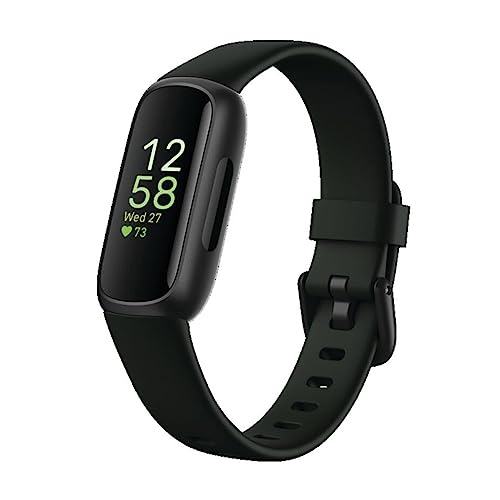
Turn settings from default to tailored — a few clicks can fix big errors.Choose the most accurate heart rate source. Prefer a chest strap over wrist HR for paired devices — chest straps reduce motion artefact during runs or intervals.
Disable step‑only calorie estimation when HR is available. Enable activity recognition or manually tag workouts so the app applies the right algorithm (e.g., “strength” vs “steady run”).
Update personal info after weight or fitness changes. For example, if you gain/lose 5 kg, edit weight to keep kcal calculations accurate.
Link with nutrition and training platforms to monitor net energy trends and recovery.
Prefer apps that allow custom settings:
Track, Compare, and Adjust Over Time
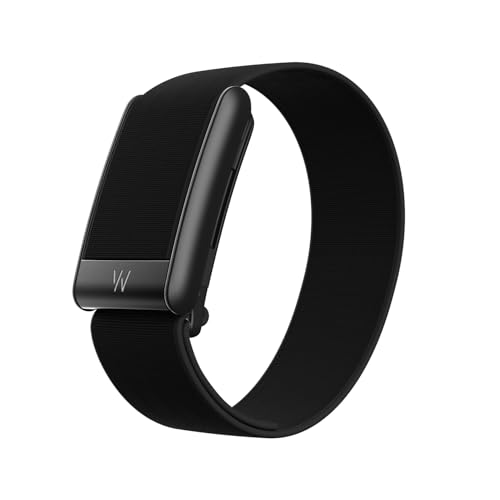
Want real accuracy? Treat calorie counts as a hypothesis you test and refine weekly.Log workouts and calories consistently for 3–6 weeks to build meaningful averages.
Compare logged calories to bodyweight trends and dietary intake to spot discrepancies.
Review for systematic bias: if weight changes contradict calorie totals (for example, losses when deficit should be neutral), apply corrections.
Adjust by doing one or more of the following:
Use long-term averages rather than single-session numbers, and factor in non-exercise activity thermogenesis (NEAT) and recovery days. Finally, periodically revalidate after fitness changes or new hardware to keep estimates trustworthy.
From Numbers to Better Decisions
Follow these six steps to make heart-rate calorie data more accurate and actionable; focus on trends over single sessions to inform training and nutrition. Try the process, track changes regularly, and share your results so others can learn—start improving now.
Minor nit: the section on ‘Know the Science’ could use a tiny chart or example math for converting HR to calorie estimates. I get the concept but a worked example would help newbies.
Agreed — a sample with numbers (HR, VO2 estimate, calories) would be super helpful when doing the calibration test.
Good feedback, Ethan. We’ll consider adding a short worked example or sample calculation in the next update to make it clearer for newcomers.
Long story: I was relying on the calorie number for dieting and felt paranoid. This guide made me realize I should use HR trends + weekly averages. I did 6 weeks of tracking and adjusted my intake based on trend lines rather than single-session numbers.
Result: steadier progress, less stress, and my watch no longer dictates my life. 10/10 would recommend the behavioral bit to everyone.
Big agree. Weekly energy balance > daily freakouts.
This — you nailed it. Data is a tool, not a judge. Appreciate hearing the success story.
Love the mental-health angle. I started ignoring single-session fluctuations too and it’s way less stressful.
That’s a great application of the guide’s final section — using averages and trends is exactly the mindset we aimed to promote. Congrats on the steady progress!
Also great reminder to correlate with performance metrics, like lifts or run times, not just calories.
Loved the ‘Use Heart Rate Zones and Context’ part. Staring at a calorie number alone is kinda pointless if you ignore zone intensity. That said, does anyone have tips for setting custom zones if you don’t do a lab test?
You can estimate zones from age-predicted max HR (220-age) as a starting point, then refine using perceived exertion or a field max test (e.g., 3–5 minute maximal effort) and adjust over time based on how you feel.
I appreciate the ‘From Numbers to Better Decisions’ ending. Too many guides stop at data collection and forget the decision layer. Quick note: I use the data to change meal timing and not obsess over every calorie — helps keep sanity. 🙂
Short: this guide is practical and approachable. A couple of emojis would make it feel friendlier tho 😂. Kidding but seriously — helpful stuff.
This guide was super practical and not too nerdy — nice balance. A couple of extra tips from me:
– Make sure your age/weight/VO2 estimate in the app is accurate.
– Do the validation test when you’re well-rested.
– Re-calibrate every few months or after big fitness changes.
Also, random tip: if you’re cold, wrist readings can be worse. Gloves or warmed skin = better contact. 😄
Thanks Sophie — those are excellent, real-world tips. The guide touches on re-checking over time and context; your points reinforce why.
If anyone wants, I can add a short checklist post about seasonal/temperature effects on wrist sensors — would that be helpful?
Re-calibrating after major fitness shifts is so important. Hit a plateau once and my watch kept lying to me 😑
Whaaat I had no idea cold affected wrist sensors that much. Good to know — I always train early mornings.
A few practical notes from my experiments:
– Chest straps = best for intervals
– Wrist ok for long steady runs
– Always update user weight and don’t lie about age (seriously)
– If calories seem low, check if the app is excluding basal metabolic rate or including it
One complaint: some apps hide whether they show net or gross calories. That needs to be obvious.
Yes! I wasted weeks misinterpreting gross vs net — thanks for the reminder.
Also don’t forget to set correct activity type — some apps treat cycling vs running differently for calorie calcs.
If in doubt, email the app support — some will clarify how they compute totals.
Great checklist, Ryan. The gross vs net calorie labeling is an important UX issue — we’ll add a callout about verifying what’s being reported.
Tried the ‘calibrate and validate with simple tests’ tonight. Did the 3-minute step test, and my watch threw a tantrum but the chest strap behaved. Also: please add troubleshooting for Bluetooth dropouts — spent 15 minutes pairing devices 🙃
Firmware updates fixed my dropout issues months ago. Worth checking.
If pairing is flaky, try toggling Bluetooth off/on and restart both devices. Also delete old pairings sometimes helps.
Thanks Chloe — pairing/troubleshooting tips are a great idea for an FAQ. Bluetooth dropouts can skew short tests; we recommend testing with both devices connected and checking firmware updates.
Short and sweet: step 5 (optimize app settings) saved me. Had duplicates in data sources and my phone was also doing HR reads (why?) — turned off extras and numbers got cleaner.
Okay — long post incoming. I tried to calibrate my watch using the 20-minute steady-state test from the guide and then compared it to my weekly totals. Here’s what I found:
1) Day 1: did the 20-min test, recorded avg HR and calories.
2) Day 2–4: did similar workouts at same perceived effort; calories were off by ~8–12%.
3) Tweaked settings (body weight, correct watch placement), re-ran test — improved to ~4%.
Lesson: small setup details (watch tightness, correct user profile) actually matter a ton. Also, weigh yourself before and after long runs to cross-check calorie trends — fluid loss messes with perceptions. Not perfect science but hey, incremental improvements = better decisions. 😅
Love the weighing tip post-run. I do that too to check sweat rate and estimate fuel usage — helps explain weird calorie spikes.
Can you share which exact watch and strap you used? Might help others replicate the test.
Using a mid-range GPS watch (no name brand here lol) and a separate Bluetooth chest strap. For apps I synced to my usual training platform — simple spreadsheets also helped me track differences.
Thanks for sharing the step-by-step experience, Jordan. That real-world testing is exactly what section 3 recommends — and the percentage improvements you saw are typical after correcting profile/settings.
Awesome breakdown — super practical. Curious: what app were you using to compare weekly totals?
Question: For people doing strength training (not cardio), how useful is HR-based calorie tracking? My lifts spike HR a bit but it’s not the same metabolic load as a run. Thoughts?
Great question. HR-based estimates can under- or over-estimate calories for resistance work because of EPOC and localized muscle effort. Use HR as context (intensity markers) and combine with session duration and RPE. Over time, track trends rather than trusting single-session calories.
Agree with admin. I treat lifting sessions as ‘higher HR isn’t proportional to calories the same way as cardio.’ I log them separately and focus on progress/reps.
Tiny typo spotted in step 2 (‘calibation’ instead of calibration) — otherwise solid. Also curious if anyone uses multiple apps and merges data? Any caveats?
Thanks for catching that typo, Isla — we’ll fix it. Regarding multiple apps: merging can be okay but watch out for double-counting calories if both apps estimate active calories. Use one primary source for calorie totals.
Really liked the breakdown on calibration steps — the simple tests section was gold. I always thought my watch was ‘close enough’ but the difference after doing a 10-min validation surprised me. Quick Q: anyone else notice a big gap between wrist-based HR and chest strap during intervals?
Good point, Liam — the guide mentions chest straps being more reliable during rapid HR changes. Wrist optical sensors often smooth or lag due to sensor processing.
Same here. Chest strap for intervals, wrist for steady-state. Convenience vs accuracy tradeoff.
Yes! Wrist sensors lag during sprints. I switched to a chest strap for HIIT and it’s much more stable.
Fun fact: my friend tried ‘calibrating’ by running with the watch in his pocket and then got offended when the numbers were nonsense. 😂 Moral: follow the setup instructions, folks.
Haha — classic. Placement matters a surprising amount. The guide’s device setup section covers placement and snugness for that reason.