

Why the Right Chest Strap or Ring Tracker Matters
Chest straps and ring trackers deliver far more accurate heart rate and workout data than wrist devices; some chest straps achieve near-ECG (≈99%) accuracy, improving training, recovery, and overall safety.
What You’ll Need

Oura Ring 4: 10 Essential Facts Before You Buy
Decide what you need the tracker for: zone training, VO2-based workouts, cycling, triathlon, or everyday calorie estimates.
List your primary and secondary uses on paper or in your phone: this forces clarity (e.g., “primary: threshold and interval runs; secondary: indoor cycling data”).
Prioritize accuracy when you require precise intervals or medical-grade heart-rate zones. Choose devices with fast response times and proven ECG-level or chest-strap accuracy for performance training.
Opt for simpler, trend-focused devices when motivation, step counts, or general calorie estimates suffice — they cost less and are easier to wear.
Identify required compatibilities early (Bluetooth/ANT+, multisport modes) and set a realistic budget range.
Example: “I’m training for a triathlon — I need swim-friendly tracking, cycling power pairing, and very accurate HR for threshold sets.”

Step 2 — Choose Form Factor: Chest Strap vs Ring
Comfort vs accuracy — which tradeoff are you willing to accept? Rings feel subtle; straps are brutally honest.Choose the form factor that fits your sport, clothing, and daily routine. Decide whether you need the fastest, most reliable raw heart-rate signal or comfortable all-day wear.
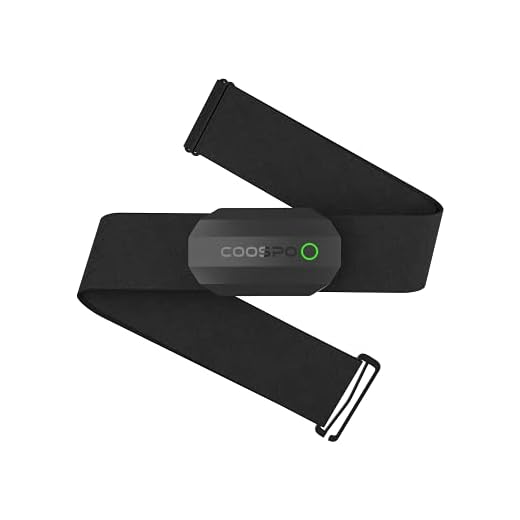
Chest straps deliver the quickest, most accurate HR for high-intensity efforts (sprints, rowing, interval runs) and pair well with cycling kits and layered winter clothing.
Ring trackers provide comfortable 24/7 wear, superior sleep and recovery metrics, and work well for everyday activity and weightlifting, though they can lag slightly during sudden HR spikes.
Consider practical examples: if you sprint or do frequent intervals, pick a chest strap; if you value all-day comfort and sleep data, pick a ring.

Step 3 — Evaluate Sensor Technology and Accuracy
Not all sensors are created equal — want data you can actually trust?Compare the sensor type, sampling rate, and signal processing before you buy. Look beyond marketing claims.
Check these specifics:
Check third‑party validation studies, sport-specific user reviews, and whether the device reports raw RR or HRV data if you need advanced metrics.

Step 4 — Connectivity, Compatibility, and Battery Life
Will it play nice with your watch, bike computer, and favorite app — and die mid-interval?Confirm connectivity options: Bluetooth, ANT+, or proprietary integrations. Ensure the tracker pairs with your phone, watch, bike computer, or gym equipment — e.g., ANT+ for Garmin bike heads, Bluetooth for Zwift on your phone, proprietary links for some studio bikes.
Check battery life and charging method. Chest straps often use replaceable coin cells or rechargeable packs; rings require regular charging but can last days between charges. Know your charging habit.
When evaluating, test these practical items:
Step 5 — App Ecosystem, Data Depth, and Privacy
Do you want raw data for coaches and scientists, or polished summaries for motivation?Assess the manufacturer app and third‑party support. Open the app and check available metrics: heart‑rate zones, training load, HRV, and whether you can view trends over weeks.
Verify export and integration options. Confirm you can export FIT/CSV files and link to Strava, TrainingPeaks, or your coach’s platform — e.g., export a FIT file for a coach to analyze intervals.
Evaluate data control and privacy. Read the privacy policy: can you export, delete, or control your data?
Look for practical features:
Assess the manufacturer app and third-party support. Does it provide detailed heart-rate zones, training load, HRV, exportable files (FIT, CSV), or integrations with Strava, TrainingPeaks, or your coach’s platform? Consider data ownership and privacy policies: can you export and control your data? Look for customizable alerts, firmware updates, and solid customer support for troubleshooting.

Step 6 — Try, Compare, and Decide Within Your Budget
A test run beats a wishlist — here’s how to evaluate real-world performance before committing.Test devices in real sessions that mirror your normal training. Try a tempo run, interval session, or full spin class and note comfort, strap fit, and whether a ring shifts during movement.
Check these key points:
If possible, test devices during workouts that reflect your regular training. Pay attention to comfort, signal dropouts, time-to-first-lock, and how data aligns with perceived exertion. Compare price vs features: cheaper straps may be fine for casual users; athletes need higher-grade sensors and robust ecosystems. Factor in warranties, return policies, and long-term costs like replacement batteries or ring chargers.

Make the Choice That Fits Your Training
Match your goals, sport, and tech ecosystem to the form factor and features you need; test devices, choose the one that reliably delivers actionable data, try it and share results!
A bit of sarcasm: ‘Make the Choice That Fits Your Training’ — easy to say when my training budget is a dollar and a dream 😂
But seriously, the tips on prioritizing features helped me avoid fancy extras I didn’t need.
A dollar and a dream is my training plan too 😂
At least dreams are lightweight and won’t drain the battery.
Same here. I resisted the bells and whistles and saved $100.
Haha — budget constraints are real. Glad the prioritization advice helped you avoid unnecessary features.
This is more helpful than the one-size-fits-all reviews out there. I appreciate the ‘Try, Compare, and Decide Within Your Budget’ step — it made me actually try two cheaper straps before spending big.
One thing I added: test the strap for chafing during long sessions — some materials rub weirdly after 60+ minutes.
Great tip about chafing — we mentioned comfort but not the session-length angle. We’ll add that to Step 6’s checklist.
Good call. I learned the hard way during a charity ride. 😅
Also test washability — sweaty gear gets gross fast.
Yep. I keep an old strap specifically for long endurance days.
Minor complaint: the guide used some jargon without explaining (like HRV and ANT+). For newbies, a tiny glossary or tooltips would be clutch. Otherwise very useful.
HRV confused me for a while too. A short explainer would help a lot of people.
Agreed. Even a ‘read this first’ sidebar would help novices.
Good suggestion — we assumed some background but a glossary is a good accessibility improvement. We’ll add one.
Anyone else find Bluetooth drops annoying mid-run? Step 4 discusses connectivity but I still get torn between ANT+ and Bluetooth — which is more future-proof?
I use a dual-mode strap (BT + ANT+) — peace of mind and fewer dropouts.
Bluetooth is more universal for phones and most modern training apps, but ANT+ is still great for multisport setups and some bike computers. If you only use a phone, Bluetooth is fine; if you have specialized hardware, consider ANT+.
If you’re hunting accuracy, don’t forget firmware updates. I had a strap that improved dramatically after an update. Step 3 should remind people to check for active dev support from the maker.
Oh yes — hardware can be fine but software kills the experience.
And don’t forget community forums — they often post unofficial fixes.
Totally. Some brands abandon devices and that’s a huge problem.
Nice addition — we’ll highlight manufacturer support and firmware cadence in Step 3. Good for longevity and accuracy.
Some nitpicks: loved the article but the battery section could be more specific about expected real-world runtimes. ‘Weeks’ vs ‘hours’ is vague. Maybe list typical examples: coin cell ring = months, chest strap rechargeable = 10-20 hours per charge, replaceable battery = 300-500 hours, etc.
Yes please — I once bought a strap expecting months and got two weeks. So annoying.
Fair point, Hannah. We kept it high-level but adding typical ranges and examples would definitely help readers. We’ll expand Step 4 with those specifics.
More numbers would make comparison quicker — agreed.
I have a weird question: for triathlon, should one carry both a ring and a strap? It seems like overkill but I want accurate HR on the bike and swim.
I use a chest strap for swim and a watch for bike/run. Works well.
Not weird at all. Many triathletes use a strap for the swim (some straps are swim-friendly) and switch to wrist/ring later, or use one device with the right protocols. Step 2’s form-factor advice and Step 4’s connectivity points will help you decide.
I loved the privacy section. A lot of fitness apps hoard data and forget to mention it. If the app won’t let you export or delete your data easily, I walk away. 📱🔒
Exactly — Step 5 aims to make that a checklist item. Look for export options and clear privacy policies.
Totally. Also check if the company shares data with advertisers. Some hide that in the tos.
Long comment because I got excited and took notes while reading:
1) The CPU of accuracy is real — don’t skimp if you’re doing performance training.
2) Try straps in both dry and sweaty states.
3) Battery life vs convenience — coin cells are painless but replaceable, rechargables you need to remember to charge.
4) App ecosystem: make sure your coach or platform accepts the data format.
5) Return policy matters.
Nice guide, made me actually plan my next purchase instead of impulse-buying.
Agree — coaches hate having incompatible files 😅
Love the note-taking energy, Zoe. Those five points are basically a mini-checklist — thanks for summarizing!
I screenshoted this for future purchases. Very practical.
Also add ‘does it pair with your bike computer’ to #4 if you’re a cyclist.
That checklist should be pinned somewhere.
Lol I read ‘try before you buy’ and then realized 90% of stores won’t let you sweat in the demo units. Still, I borrowed one from a friend and it saved me a bad purchase. 10/10 recommend borrowing.
I actually demoed in a gym class once — ask instructors, they usually have a strap or two.
Borrowing is a great tactic — glad it worked for you. If you can’t borrow, check return policies carefully before committing.
Short and sweet — I wish the guide had a quick comparison table (chest vs ring) but the pros/cons list was helpful. For weightlifting I find chest straps annoying but accurate; ring trackers are comfy but can miss intense efforts.
I use a ring for daily HRV and a strap for training labs. Best of both worlds.
Good point. We wanted to avoid overwhelming readers but a table could’ve been neat. We’ll consider adding one in an update.
Same here. Rings are better for sleep tracking too.
Great breakdown. I switched from a wrist HR monitor to a chest strap last year and the difference in accuracy during sprints is crazy. The guide’s point about sensor tech (Step 3) is spot on — don’t get fooled by flashy marketing.
Agree — chest straps pick up the spikes better. Which strap did you end up using?
Thanks for sharing your experience, Mark — that’s exactly why we emphasized real-world testing in Step 6. Any specific strap you liked for sprints?
Polar H10 is still king in my book for accuracy during intervals.
Random thought: for people training on a budget, any cheap ring recs? The guide’s budget step helped me justify a mid-range strap but curious about affordable rings for casual users.
Check out used older models from reputable brands — often a good deal.
A cheap option is better than nothing, but read reviews carefully — some cheap rings are more gimmick than function.
Affordable rings vary a lot by region. Look for ones with replaceable coin cells and basic HR accuracy reviews. They won’t match high-end straps but are fine for casual tracking.
Noticed the guide didn’t say much about strap sizes for women specifically. Fit matters a ton — some straps are just built for male chest shapes and slip around during high-intensity stuff. Maybe add a note on adjustable sizes or add-on extenders?
Great observation, Priya. We’ll add a fit subsection under Step 2 to call out gender/shape considerations and extenders.
Also looks like some straps have dedicated ‘women’s’ bands now. Worth checking.
Yep — my partner needed a smaller strap and the extender saved us. Or rather, the smaller band actually… you know what I mean 😅